My Android does not accepts Minim & Processing.Sound Libraries. Are there any option for playing sound/music files to my games? Is there a function that makes my games to the size of the screen of my phone? There are things connected and depends on positions so if I do everything manually ill have a long time and pain to almost re-do the games. If I printline the width and height I get the real pixel size of the nexus 5 that is x = 1080 y = 1776 but the positions and processes of the game keeps the same values and it will be hard to change everything. Another thing to add, if I change the phone from vertical to horizontal position, the x and y changes and I'll have a mess. I need a function to fix this. Are there any? I'm convinced that for gaming, my next games should use game engines like Unreal or Unity. But the work is done here and I am asking if there are solutions for both of this questions. Thanks for having a look here. Thanks if you answer.
↧
Sound & Size?
↧
Processing for android discontinued?
Hi
I was using processing for android couple of years ago with Processing 1.5 version. It worked well. I recently downloaded processing 2 and android. It gives errors like error from inside android tools, etc. I installed in another laptop and there was no android mode at all.
I followed every blog on the web and related queries in this forum about path setting and stuff. Still no progress. Can someone throw some light? Is processing for android available any more?
↧
↧
Multitouch
Is it possible to use this feature of the phone? I Mean creating a virtual analog thumb, and a pair of buttons. HOW?
↧
"Android mode is not compatible with this revision of Processing"
Hi.
I wanted to get started with this function, but I cannot install it, but when I put the AndroidMode folder in "modes" and I try to select it in Processing, it says that it's not compatible. I definitely don't know why because it seems a simple process and I checked some guides trying to solve this.
Any idea about what should I do? I use Processing 3.0a5 and, of course, I tried other versions, but the same problem appears. A screenshot: http://s1323.photobucket.com/user/Anti_2/media/processingandroid_zpsuruchl32.png.html
Thank you.
↧
How to embed my Processing sketch in an Android fragment
I found a discussion in the forum where someone shows that it's possible, but not a single line of code... It was 2 years ago and I haven't been able to find more updated info about this. http://forum.processing.org/one/topic/how-to-embed-processing-for-android-in-native-android-apps.html
↧
↧
import android.view.MotionEvent?
I have the ketai library and wrote this: import ketai.ui.*;. Then this: import android.view.MotionEvent but the console prints me: No library found for android.view. The label above the console prints me:"The type android.view.MotionEvent cannot be resolved. It indirectly referenced from required .class files". How can I fix this? Do I have to download something? If I have to download, how can I download it?
↧
Can not see Android Mode in "Add Mode", LINUX - debian


Think I have installed everything that is needed. Sorry for my english.. please, help.
↧
"Error during download and install of Android Mode"
I have followed the installation instructions of the Processing-Android Wiki, but when I try to add the Android Mode, I get this error message: "Error during download and install of Android Mode" It seems like the download does not complete / does not open completely / or won't run. I am not sure. See image below. Thanks for the help.
↧
"Android Mode" not Listed in Modes List
I want to install Android Mode on Processing, but I have a problem: Android mode is not listed in my Modes list. I have acquired the Android Mode library by downloading Processing 3, running it in Sandboxie, installing it, and copying the zip file it downloads out. I then tried to install it by unzipping it and copying it to %USERNAME%\Documents\Processing\modes and running Processing, but it is still not listed.
What can I do to install Android mode manually?
Here are the instructions that I used to try to manually install: http://madrid.verkstad.cc/en/course-literature/processing-android-mode/
↧
↧
read and write to the same csv file in a processing app
Hello everybody, A month ago I started to make my own android app via processing. Now I’ve got the problem that I want to read some information’s about levels ( e.g. if they have been accomplished ) and the highscore from a csv file. I change the values of the cells in the csv with saveInt() and afterwards i save them with saveTable(). The Problem is , that if I type the loaded filename in the saveTable function, to save the changes witch I have made with saveInt , a new csv file is created in the sketch Folder instead of overwriting the existing file in the data directory. I tried to type data/ before the filename in saveTable(), which works perfectly in the normal java Mode. When i try to launch the Program in Android Mode, I get the following Exception:
FATAL EXCEPTION: Animation Thread Process: processing.test.gui_spiel2_ver_and_vers, PID: 6316 java.lang.IllegalArgumentException: File data/gamedata_2.csv contains a path separator
It seems like the saveTable function doesn´t accept paths in android mode.
Does someone know how to fix the Problem or a (hopefully simple) way to r/w and save the same csv file?
Hope some of you might help me :)
thank you!
↧
Can't see or install Android Mode
Howdy,
The issue: Processing 2.1.1 doesn't show Android Mode. Later versions of Processing, i.e. 3.0a11, does have Android Mode, but can't locate the library.
I have been looking around for the reason my Processing won't properly show (or load) the Android Mode and Library. I followed the Instructions here (installed both SDK Studio, when that didn't work I also got the standalone installer). I confirm that I have the SDKs installed, and I have Processing 2.1.1. I Installed the Android SDK to default location. I installed the packages too.
I have downloaded the AndroidMode.zip file and placed it in "C:\Users[me]\Documents\Processing\modes".
When I open Processing 2.1.1, there is no option for "Android" mode, just Java and Debugging. I can't "Add Mode", because AndroidMode doesn't show up in the list. (I swear though, once it did show up, but greyed out saying it's not compatible with my version of Processing...but I can't recreate that so maybe I'm mistaken).
I then browsed around and saw suggestions to get the latest build of Processing, so I got version 3.0a11 to try it out. (Note: I tried with 3.0a5, but when trying to add AndroidMode via "Add Mode", it's greyed out with note "Android Mode is not compatible with this version of Processing.")
Aha! Now I see "AndroidMode" as an option, and can choose it. Processing refreshes briefly, and it looks like I'm in Android mode.
...except, when I try to put even one line of code "import android.view.MotionEvent;", it says "Cannot find 'android.view' library". (Using "import android.*;" results in the same:

What am I missing? Did I misintall something? I've done the troubleshooting found in most threads I found, but no solution for my issue yet... :/
Note: I have read this thread and this one, to no avail.
Thanks so much for any advice or ideas!!!
↧
Android->PC UDP communication
Dear All, I spent the day try to make work the connection between android and pc via UDP. The code that I put here is what I hope "closer-to-work". Still I can't send data from PC to the Android, while the reception of PC from Android works.
::::::::::::::::::::::::: PC side code::::::::::::::::::::::::::
import hypermedia.net.*;

int portRX=50000;
int portTX=51000;
String ip="224.0.0.2";
int rx_buffer_size=100;
String rx_string="Waiting for Data";
byte[] rx_byte=new byte[rx_buffer_size];
int rx_byte_count=0;
String message="";

UDP udpTX,udpRX;
void setup() {
  size(300,300);
  udpTX=new UDP(this,portTX,ip);
  udpTX.log(true);
  udpTX.setBuffer(5);
  udpTX.loopback(false);

  udpRX=new UDP(this,portRX,ip);
  udpRX.log(true);
  udpRX.listen(true);
}

void draw(){
  background(255);
  fill(0);
  text("Is TX mulitcast: "+udpTX.isMulticast(), 20,20);
  text("Has TX joined multicast: "+udpTX.isJoined(), 20,40);
  text("Is loopback enabled on TX: "+udpTX.isLoopback(), 20,60);

  //confirm if rx is multicast
  text("Is RX mulitcast: "+udpRX.isMulticast(), 20,80);
  text("Has RX joined multicast: "+udpRX.isJoined(), 20, 100);
  text(rx_string, 20, 120);
  text(message, 20, 140);
}

void keyReleased() {
  udpsender(key+"ciao buonasera");
}

//------------------------------------------------- RECEIVER
void receive( byte[] data ) {
 message= bytes2string(data);
}

//------------------------------------------------- SENDER
void udpsender(String whatIsend){
  byte[] data = new byte[4];
  data=string2bytes(whatIsend);
  udpTX.send( data );
}

//------------------------------------------------- STRING CONVERSIONS
byte[] string2bytes(String chaine) {
  byte[] bytes = new byte[0];
  for (int i = 0; i < chaine.length(); i++) {
    bytes = append(bytes, byte(chaine.charAt(i)));
  }
  return bytes;
}

String bytes2string(byte[] bytes){
  String chaine = str(char(bytes[0]));
  for (int i = 1; i < bytes.length; i++) {
    chaine = chaine+str(char(bytes[i]));
  }
  return chaine;
}
::::::::::::::::::::::::: Android side::::::::::::::::::::::::::
import hypermedia.net.*;

UDP udpTX,udpRX;
color uno=#9C5052;
color due=#00A881;

color backgro;
int stage=0;

String receivedFromUDP = "";
String ip="224.0.0.2";
int portRX=51000;
int portTX=50000;
int rx_buffer_size=100;
String rx_string="Waiting for Data";
byte[] rx_byte=new byte[rx_buffer_size];
int rx_byte_count=0;

void setup() {
  backgro=0;
  orientation(PORTRAIT);
  smooth();

  udpTX=new UDP(this,portTX,ip);
  udpTX.setBuffer(5);
  udpTX.loopback(false);

  udpRX=new UDP(this,portRX,ip);
  udpRX.listen(true);
  super.start();
}

void draw() {
  background(backgro);
  textAlign(CENTER, CENTER);

  if(stage==0) {
    fill(uno);
    rect(0, 0, width, height/2);

    fill(due);
    rect(0, height/2, width, height/2);

    fill(255);
    textSize(36);

    text("Player 1",width/2,height/4);
    text("Player 2",width/2,height/4*3);
  }

  textSize(12);
  if(udpRX.isListening()) text("OK", width/2,height/2);

  text("Is TX mulitcast: "+udpTX.isMulticast(), width/2,20);
  text("Has TX joined multicast: "+udpTX.isJoined(), width/2,40);
  text("Is loopback enabled on TX: "+udpTX.isLoopback(), width/2,60);

  //confirm if rx is multicast
  text("Is RX mulitcast: "+udpRX.isMulticast(), width/2,80);
  text("Has RX joined multicast: "+udpRX.isJoined(), width/2, 100);
  text(rx_string, width/2, 120);
  text("message:"+receivedFromUDP, width/2,height/3);
}

//------------------------------------------------- SENDER
void udpsender(String whatIsend){
  byte[] data = new byte[4];
  data=string2bytes(whatIsend);
  udpTX.send( data );
}

//------------------------------------------------- RECEIVER
void receive( byte[] data ) {
 receivedFromUDP= bytes2string(data);
}

//------------------------------------------------- BUTTONS
boolean rectOver = false;

void mousePressed() {
  if (overRect(0, 0, width, height/2)) {
    stage=1; backgro=uno;
  }
  else {stage=2; backgro=due;}
  udpsender("s"+stage);
}

boolean overRect(int x, int y, int widthRect, int heightRect) {
  if (mouseX >= x && mouseX <= x+widthRect &&
    mouseY >= y && mouseY <= y+heightRect) {
    return true;
  }
  else {return false;}
}

//------------------------------------------------- STRING CONVERSIONS
byte[] string2bytes(String chaine) {
  byte[] bytes = new byte[0];
  for (int i = 0; i < chaine.length(); i++) {
    bytes = append(bytes, byte(chaine.charAt(i)));
  }
  return bytes;
}

String bytes2string(byte[] bytes){
  String chaine = str(char(bytes[0]));
  for (int i = 1; i < bytes.length; i++) {
    chaine = chaine+str(char(bytes[i]));
  }
  return chaine;
}
::::::::::::::::::::::::: ::::::::::::::::::::::::: I saw others having similar issues, but still could not figure out what is going wrong with mine. Thank you
↧
Question about using Animation in Java.
Hi I am building a game on Android Studio however I have used a new animation (a sea mine that glows different colours) there is 7 frames in the animation and I have used animations before and I have compared this one to the last one but my game keeps getting trapped in a loop when it reaches said animation. I know this is a processing forum but I was wondering if anyone could help. This is the section of code that is causing me bother. Ill post the whole code if you ask and think that will help.
    long mineElapsed = (System.nanoTime()-mineStartTime)/1000000;
            if(mineElapsed>2000)
            {

                System.out.println("making mine");
                //first mine always goes down the middle

                    mine.add(new seamine(BitmapFactory.decodeResource(getResources(),R.drawable.seamine),(int)WIDTH + 10,(int)(rand.nextDouble()*(HEIGHT)), 46,43,7));


                //resetTimer
                mineStartTime =System.nanoTime();
            }
so basically a knew mine should be drawn every 2 seconds. I have used print line to see if it gets in the loop. but instead of every 2 seconds it prints line loads and loads. Interestingly when I remove the animation line of code everything works perfect (except of course the mine animation isn't there)\
Any ideas?
↧
↧
P3D Behaving Strangely Since Upgrading to Processing 3
Since upgrading from Processing 2 to 3, a sketch that I have been working on for Android that uses P3D has been loading in the third quadrant of the screen only, cutting most of the app out of view. Since my explanation is somewhat hard to understand, here's a visualization to help out.
Let's say that the following is my phone's screen with a coordinate plane drawn on it with the origin being in the center.
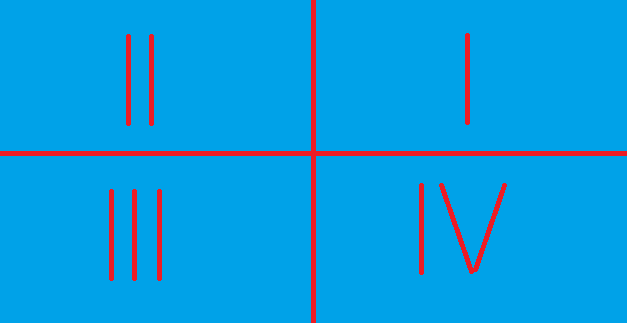
In the past, the contents of the app would load properly, but now, the contents of the first quadrant are being pushed in to the third quadrant and the contents of the other three quadrants are not visible, so the app now looks like this.
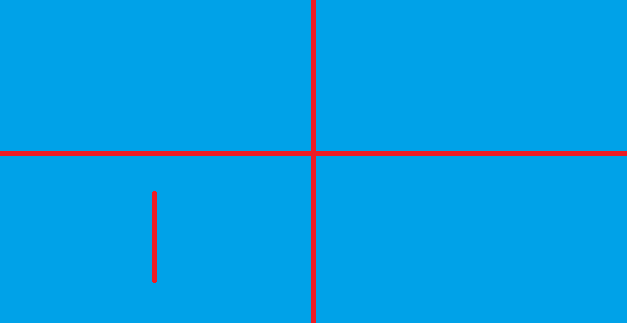
Here is the code from the draw() function that I believe may be the culprit, but do not know how to modify to resolve the issue:
 background(0);
 ortho(0, width, 0, height, -100, 100);
 camera(width / 2, height / 2, 10, width / 2, height / 2, 0, 0, 0.1, 0);
The code for setting the sketch size in the setup() function is nothing more than 'fullScreen(P3D)'.
↧
Google Cardboard SDK: is there a way to implement it in Processing for Android?
Hi guys, Google has released the SDK for his Cardboard. Now, I am looking at it, is there a way to implement it in Processing in Android Mode?
Thank you
↧
Android App crashes when Trying to Use UCanAccess
I am trying to write an Android app using Processing, and the app needs to communicate with an Access Database stored on the device. To do this, I am trying to use UCanAccess since Java 8 apparently dropped native support for this sort of thing. For whatever reason, since adding this code, running my app results in it crashing with the message "Unfortunately, My First Android App has stopped."
Why is this happening? Here is the portion of the code that relates to the question:
  import java.io.FileOutputStream;
  import java.sql.Connection;
  import java.sql.DriverManager;
  import java.sql.SQLException;
  import java.sql.Statement;
  import java.sql.ResultSet;

  import net.ucanaccess.converters.TypesMap.AccessType;
  import net.ucanaccess.ext.FunctionType;
  import net.ucanaccess.jdbc.UcanaccessConnection;
  import net.ucanaccess.jdbc.UcanaccessDriver;

  static class databasesHandler
  {
    static boolean readFromDatabase(int uid)
    {
      try {
        Class.forName("net.ucanaccess.jdbc.UcanaccessDriver");
        Connection con = DriverManager.getConnection("jdbc:ucanaccess:///sdcard/Android/data/accessDatabase.mdb");
        Statement stmt = con.createStatement();
        stmt.execute("SELECT saveVal FROM userVals WHERE userId = " + str(uid));

        ResultSet rs = stmt.getResultSet();
        boolean spotFilled = false;

        if (rs != null)
        {
          while (rs.next())
          {
            spotFilled = boolean(rs.getInt("saveVal"));
          }
        }

        stmt.close();
        con.close();
        return spotFilled;
      }
      catch(Exception e) {
        e.printStackTrace();
      }
      return false;
    }
  }
I have placed the UCanAccess library along with its lib folder within the code folder of my Processing sketch, and prior to me making this change, the app ran perfectly.
↧
Android Mode, no connected devices
Hi! First of all sorry for my english, it isn't my mother language. Then, when I select the android mode and I want to run my sketch on my android phone, I select Android -> Select device -> and then put 'No connected devices'. I have the phone connected, it's on USB debugged mode, I've downloaded the phone driver but processing doesn't recognize my phone, if someone has had the same problem or he knows about a solution, please show me it. Thanks so much.
↧
↧
Android mode takes a lot of time in between draws... why?
I just finished a very big android app. It's working great, and I've spent many hours to optimize my code to the max. The way I did this is by placing println(millis()) in a lot of places in the code and checking how long it took the program to run the code. This way I've been able to optimize my code to the max, but I'm kind of having a problem with how long it takes processing to get from the end of the last draw(), to the beginning of the new.
Here's a test running on my big app:
Beginning of draw: 12564
End of draw: 12591
Beginning of draw: 12607
End of draw: 12634
Beginning of draw: 12650
End of draw: 12677
Beginning of draw: 12694
End of draw: 12721
Beginning of draw: 12738
End of draw: 12765
Beginning of draw: 12781
End of draw: 12808
Beginning of draw: 12824
End of draw: 12851
Beginning of draw: 12867
End of draw: 12894
Beginning of draw: 12910
End of draw: 12938
Beginning of draw: 12954
End of draw: 12982
Beginning of draw: 12999
End of draw: 13026
Beginning of draw: 13042
End of draw: 13069
Beginning of draw: 13109
End of draw: 13125
Beginning of draw: 13136
End of draw: 13151
Beginning of draw: 13162
End of draw: 13174
Beginning of draw: 13185
End of draw: 13196
Beginning of draw: 13205
End of draw: 13216
Looking at just the last 3 lines, my code takes 11 milliseconds to run (which is great judging by the size of the app). The difference between the end of the last draw and the beginning of the next draw is 11 milliseconds, which I think is way too long. In the setup I set frameRate to 200 by doing:
frameRate(200);
It's not making that by far. Why does processing eat so my time in between draws?
↧
Set(x,y,image) not working
The method set(x,y,image) doesn't seem to be working in android mode, where image(image,x,y) works fine but is way too slow for the scale of the project I'm building. The error message I get returned states that my input PImage is null (which it isn't, as the image() method does work). Is there any known fix for this problem? (I will come with some error logs and actual code tomorrow)
↧
How to remove menu bar from sketch?
Hi ! I just got to working with android processing and so far its great, despite all the troubles I had to get it to run on linux. I noticed that when the sketch is running on device it shows this menu/action bar with the settings (three stacked dots) symbol. Its really an eyesore... Is there any way that this can be removed or hidden?
Thanks !
↧