Quantcast
Channel: Android Mode - Processing 2.x and 3.x Forum
Viewing all 941 articles
Browse latest View live

why wont this work? and how do i connect the device? no instructions

$
0
0

just downloaded this lib for android from the mngr in P2 but nothing for how to connect android cam

import com.onlylemi.processing.android.capture.*;

AndroidCamera ac;
PImage img;

void setup() {
  size(720, 480);
  ac = new AndroidCamera(width, height, 30);
  ac.start();
}

void draw() {
  img = ac.getCameraImage();
  image(img, 0, 0);
}

How to manually create Android TextField in Processing ?

$
0
0

Hi everyone, I'm on a project on Android where I have to input some text in Japanese (with google IME keyboard as an example), and as you probably know, I looked a lot for it on forums, and neither controlP5 TextField nor APwidgets work on Processing 3.x... So I was wondering if there was any possibility of creating a "normal" Java TextField in Processing which could normally get IME keyboard characters (I'm not Java skilled enough for that so I hope you'll be able to help me^^) Thanks forward !

Nice android update RC4

$
0
0

Thanks for the Release Candidate 4 update... have been fiddling for a few days trying to sort out the hiding of the navigation bar and this release does it for me :) As it say in the wiki, the aim is make android development 'trivially easy', just code and hit run, and this certainly helps make it that way!!

feeling grateful to the developers

replacing processing.net code by netp5 code for android mode

$
0
0

I wrote a simple code in processing using processing.net library to send a data to my wishield to control it...however what i was trying to do was go to android mode and use it, I found that processing.net doesn't work in android mode so now i need to write a code using OSCP5 and netP5, i'm trying it whole day but not a single success in even turning on a led...my processing.net code is

import processing.net.*;
Client myClient;
//int dataIn;
String data;

void setup() {
  size(200, 200);
  myClient = new Client(this, "192.168.1.122", 1000);
}

void draw() {
  fill(255,0,0);
rect(50,50,100,100);
  if (myClient.available() > 0) {
  //dataIn = myClient.read();
   data = myClient.readString();
  println(data);
  }
  //background(dataIn);
myClient.clear();
}
void mousePressed() {
  myClient.write("1\n");
  myClient.stop();
    myClient = new Client(this, "192.168.1.122", 1000);
}

all i want to do is send "1\n" to my device 192.168.1.122 at port 1000 using netP5 and Osc5, I'm new to these libraries and I've not been able to get any result despite trying to hack into tcp codes...please provide me with small code example to just send "1\n" to the needed ip address at required port...then maybe i can develop an android app

first time messing around with example

$
0
0

why can i use the emulator ?

Capture

[mkdir] Created dir: C:\Users\Franks\AppData\Local\Temp\android7965673251403507050sketch\bin
[echo] org.eclipse.jdt.core.JDTCompilerAdapter

-set-mode-check:

-set-debug-files:

-check-env:
Android SDK Tools Revision 25.1.6
Installed at C:\Users\Franks\Documents\Processing3\modes\AndroidMode\sdk

-setup:
     [echo] Project Name: CameraImage
Project Type: Application

-set-debug-mode:

-debug-obfuscation-check:

-pre-build:

-build-setup:
Using latest Build Tools: 24.0.0 rc3
     [echo] Resolving Build Target for CameraImage...
Project Target:   Android 6.0
API level:        23
     [echo] ----------
     [echo] Creating output directories if needed...
    [mkdir] Created dir: C:\Users\Franks\AppData\Local\Temp\android7965673251403507050sketch\bin\res
    [mkdir] Created dir: C:\Users\Franks\AppData\Local\Temp\android7965673251403507050sketch\bin\rsObj
    [mkdir] Created dir: C:\Users\Franks\AppData\Local\Temp\android7965673251403507050sketch\bin\rsLibs
    [mkdir] Created dir: C:\Users\Franks\AppData\Local\Temp\android7965673251403507050sketch\gen
    [mkdir] Created dir: C:\Users\Franks\AppData\Local\Temp\android7965673251403507050sketch\bin\classes
    [mkdir] Created dir: C:\Users\Franks\AppData\Local\Temp\android7965673251403507050sketch\bin\dexedLibs
     [echo] ----------
     [echo] Resolving Dependencies for CameraImage...
Library dependencies:
No Libraries

------------------
     [echo] ----------
     [echo] Building Libraries with 'debug'...
   [subant] No sub-builds to iterate on

-code-gen:
Merging AndroidManifest files into one.
Manifest merger disabled. Using project manifest only.
     [echo] Handling aidl files...
No AIDL files to compile.
     [echo] ----------
     [echo] Handling RenderScript files...
     [echo] ----------
     [echo] Handling Resources...
Generating resource IDs...
     [echo] ----------
     [echo] Handling BuildConfig class...
Generating BuildConfig class.

-pre-compile:

-compile:
    [javac] Compiling 4 source files to C:\Users\Franks\AppData\Local\Temp\android7965673251403507050sketch\bin\classes
----------
1. WARNING in C:\Users\Franks\AppData\Local\Temp\android7965673251403507050sketch\src\processing\test\cameraimage\CameraImage.java (at line 4)
    import processing.data.*;
           ^^^^^^^^^^^^^^^
The import processing.data is never used
----------
2. WARNING in C:\Users\Franks\AppData\Local\Temp\android7965673251403507050sketch\src\processing\test\cameraimage\CameraImage.java (at line 5)
    import processing.event.*;
           ^^^^^^^^^^^^^^^^
The import processing.event is never used
----------
3. WARNING in C:\Users\Franks\AppData\Local\Temp\android7965673251403507050sketch\src\processing\test\cameraimage\CameraImage.java (at line 6)
    import processing.opengl.*;
           ^^^^^^^^^^^^^^^^^
The import processing.opengl is never used
----------
4. WARNING in C:\Users\Franks\AppData\Local\Temp\android7965673251403507050sketch\src\processing\test\cameraimage\CameraImage.java (at line 10)
    import java.util.HashMap;
           ^^^^^^^^^^^^^^^^^
The import java.util.HashMap is never used
----------
5. WARNING in C:\Users\Franks\AppData\Local\Temp\android7965673251403507050sketch\src\processing\test\cameraimage\CameraImage.java (at line 11)
    import java.util.ArrayList;
           ^^^^^^^^^^^^^^^^^^^
The import java.util.ArrayList is never used
----------
6. WARNING in C:\Users\Franks\AppData\Local\Temp\android7965673251403507050sketch\src\processing\test\cameraimage\CameraImage.java (at line 12)
    import java.io.File;
           ^^^^^^^^^^^^
The import java.io.File is never used
----------
7. WARNING in C:\Users\Franks\AppData\Local\Temp\android7965673251403507050sketch\src\processing\test\cameraimage\CameraImage.java (at line 13)
    import java.io.BufferedReader;
           ^^^^^^^^^^^^^^^^^^^^^^
The import java.io.BufferedReader is never used
----------
8. WARNING in C:\Users\Franks\AppData\Local\Temp\android7965673251403507050sketch\src\processing\test\cameraimage\CameraImage.java (at line 14)
    import java.io.PrintWriter;
           ^^^^^^^^^^^^^^^^^^^
The import java.io.PrintWriter is never used
----------
9. WARNING in C:\Users\Franks\AppData\Local\Temp\android7965673251403507050sketch\src\processing\test\cameraimage\CameraImage.java (at line 15)
    import java.io.InputStream;
           ^^^^^^^^^^^^^^^^^^^
The import java.io.InputStream is never used
----------
10. WARNING in C:\Users\Franks\AppData\Local\Temp\android7965673251403507050sketch\src\processing\test\cameraimage\CameraImage.java (at line 16)
    import java.io.OutputStream;
           ^^^^^^^^^^^^^^^^^^^^
The import java.io.OutputStream is never used
----------
11. WARNING in C:\Users\Franks\AppData\Local\Temp\android7965673251403507050sketch\src\processing\test\cameraimage\CameraImage.java (at line 17)
    import java.io.IOException;
           ^^^^^^^^^^^^^^^^^^^
The import java.io.IOException is never used
----------
11 problems (11 warnings)

-post-compile:

-obfuscate:

-dex:
input: C:\Users\Franks\AppData\Local\Temp\android7965673251403507050sketch\bin\classes
input: C:\Users\Franks\AppData\Local\Temp\android7965673251403507050sketch\libs\AndroidCaptureForProcessing.jar
input: C:\Users\Franks\AppData\Local\Temp\android7965673251403507050sketch\libs\processing-core.jar
Pre-Dexing C:\Users\Franks\AppData\Local\Temp\android7965673251403507050sketch\libs\AndroidCaptureForProcessing.jar -> AndroidCaptureForProcessing-a94a90838446abe8207a27779475a283.jar
       [dx]
       [dx] PARSE ERROR:
       [dx] unsupported class file version 52.0
       [dx] ...while parsing com/onlylemi/processing/android/capture/AndroidCamera.class
       [dx] 1 error; aborting

BUILD FAILED
C:\Users\Franks\Documents\Processing3\modes\AndroidMode\sdk\tools\ant\build.xml:888: The following error occurred while executing this line:
C:\Users\Franks\Documents\Processing3\modes\AndroidMode\sdk\tools\ant\build.xml:890: The following error occurred while executing this line:
C:\Users\Franks\Documents\Processing3\modes\AndroidMode\sdk\tools\ant\build.xml:902: The following error occurred while executing this line:
C:\Users\Franks\Documents\Processing3\modes\AndroidMode\sdk\tools\ant\build.xml:283: null returned: 1

Total time: 2 seconds

APDE when Compiling on smartphone, Ketai library not found, although installed.

$
0
0

hi. if i may ask you something , for the moment i have a samsung galasx j5, androidv.:5.1.1 lollilop and i have the apde app the latest one 0.3.3 .. its working fine with its inbuild examples, i installed the ketai libraray and tried to run some sketches but it failed to compile with Error " No libray found fpr ketai sensors, although the library is intsalled .. can u tell something about it ?

When I run my android project on phone the dimensions are only 100 by 100

$
0
0

My phone has dimensions 540 by 960 but when I run my application on my phone it only appears 100 by 100, please tell me how to fix it.

Preventing standby Android phone in an application?

$
0
0

Hello, I make an Android app that uses the tilt to control so the screen is idle and off. How blocked the screen on? I use APDE and I am under Android 5.1. Exuse me for my english, I speek frensh. Tank you.


has anyone got success using the ketai library?...

$
0
0

with trying to compile and ran the Sketch on the Device itself using the APDE App ?

I'm switcing from pc to android and usally mouse x and mouse y doesnt work this is a wack a mole gam

$
0
0

So this is a wack a mole game where the red (Villan) is supposed to give you points (this isnt working) I think it somthing to do with the mousex mousey im not sure as it doesnt work when i port it too android but it does work on pc

 int score;
float x, y, x1, y1;
float diameterVillan = 125;//diameter of circle
float diameterHero = 125;
int time = 10; // how long it is displayed
int time1= 5;
int lastTime, lastTime1; // When the current circle was first displayed

void setup() {
  size(1920,1080);//turn off for android mode
  background(255);
  textFont( createFont("Arial.vlw", 16) );//font change it
  randomGenerator();//calls method
  randomGeneratorHero();
  lastTime = second();//make last time into secondecound
  lastTime1 = second();
}

void draw() {
  background(255);
  fill(#FC0000);//color of circle
  ellipse(x, y, diameterVillan, diameterVillan);//draw the circle
  // if time to display the circle is over
  if (second() - lastTime >= time){
    // create new circle
    randomGenerator();
    lastTime = second();
  }
  // print score
  if (score < 10) {
    text("Score = " + score, 10, 10);
  }
  else {
    text("You Win!!", 10,  10);
  }
  //hero
  fill(#0000FF);//color of circle
  ellipse(x1, y1, diameterHero, diameterHero);//draw the circle
  // if time to display the circle is over
  if (second() - lastTime1 >= time1){
    // create new circle
    randomGeneratorHero();
    lastTime1 =   second();
  }
  /* print score
  if (score < 10) {
    text("Score = " + score, 10, 10);
  }
  else {
    text("You Win!!", 10,  10);
  }*/
}

void mouseClicked() {
  if (x - diameterVillan * .5 <= mouseX && mouseX <= x + diameterVillan * .5 &&
    y - diameterVillan * .5 <= mouseY && mouseY <= y + diameterVillan * .5) {
    score += 1;
    // create new circle after mouse is clicked
    randomGenerator() ;
    lastTime = second();
    }


  if (x1 - diameterHero * .5 <= mouseX && mouseX <= x1 + diameterHero * .5 &&
    y1 - diameterHero * .5 <= mouseY && mouseY <= y1 + diameterHero * .5) {
    text("You Lost", 10, 10);

    }
}


void randomGenerator() {
  // creates new circle
  x = random(0 + diameterVillan, width - diameterVillan);
  y = random(0 + diameterVillan, height - diameterVillan);
}
void randomGeneratorHero() {
  // creates new circle
  x1 = random(0 + diameterHero, width - diameterHero);
  y1 = random(0 + diameterHero, height - diameterHero);
}

How to add admob?

$
0
0

sorry my english low.

download Google Play Services in sdk and "google-play-services.jar" add my sketch.

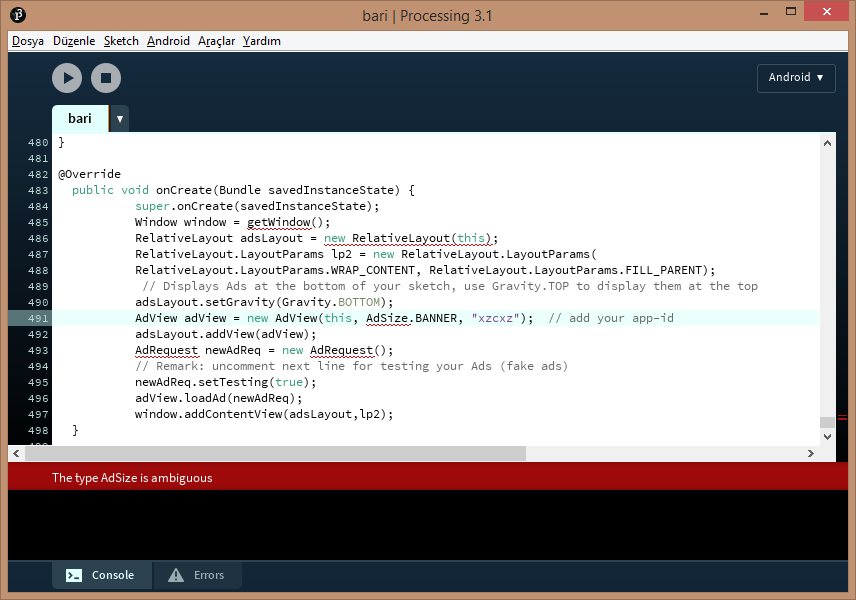
import cassette.audiofiles.*; import android.os.Bundle; import android.view.Gravity; import android.view.Window; import android.widget.RelativeLayout; import com.google.ads.*;

edit:

`

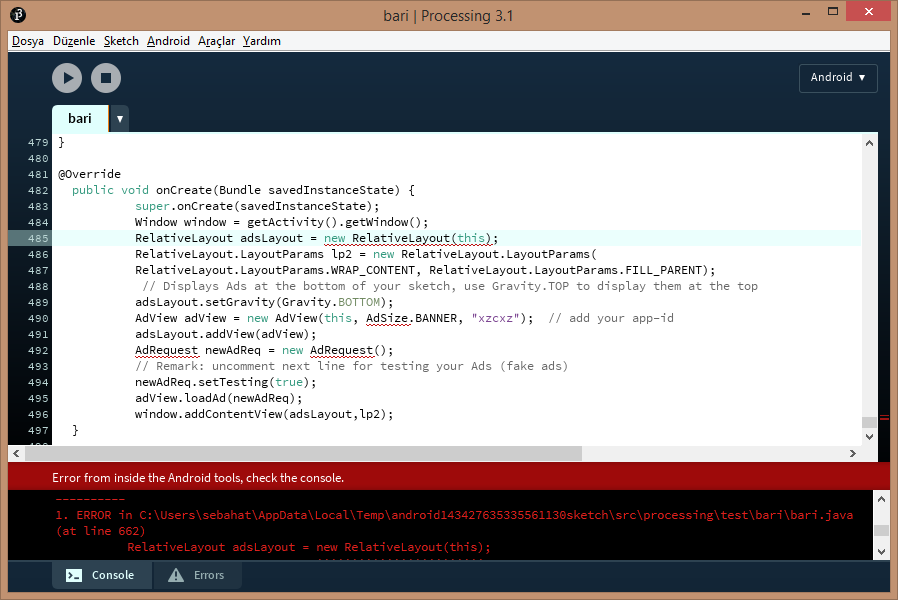
  1. ERROR in C:\Users\sebahat\AppData\Local\Temp\android143427635335561130sketch\src\processing\test\bari\bari.java (at line 662) RelativeLayout adsLayout = new RelativeLayout(this); ^^^^^^^^^^^^^^^^^^^^^^^^

The constructor RelativeLayout(bari) is undefined

  1. ERROR in C:\Users\sebahat\AppData\Local\Temp\android143427635335561130sketch\src\processing\test\bari\bari.java (at line 667) AdView adView = new AdView(this, AdSize.BANNER, "xzcxz"); // add your app-id ^^^^^^

The type AdSize is ambiguous

  1. ERROR in C:\Users\sebahat\AppData\Local\Temp\android143427635335561130sketch\src\processing\test\bari\bari.java (at line 669) AdRequest newAdReq = new AdRequest(); ^^^^^^^^^

The type AdRequest is ambiguous

  1. ERROR in C:\Users\sebahat\AppData\Local\Temp\android143427635335561130sketch\src\processing\test\bari\bari.java (at line 669) AdRequest newAdReq = new AdRequest(); ^^^^^^^^^ The type AdRequest is ambiguous

`

How to set icon in android processing?

How To Put Admob In the Sketch?

$
0
0

Hello, I want to know how to put ADMOB in processing sketch. any help would be nice. Thanks in advance.

set fullscreen window resolution

$
0
0

When I use size() in Android Mode,its resolution become phone original resolution. so I run sketch, it takes bad performance. How can I set fullscreen window resolution?

Back button and Menu button in android

$
0
0

void keyReleased() { if (key==CODED){ if(keyCode==MENU || keyCode==BACK){//MENU and BACK keys //do things } } keyCode=0; } in this code, when back button pressed, the program just quit. and Menu button, you know, like this KakaoTalk_20160522_113457617

How can I press back button in sketch without quit?


Question about QRCode library

$
0
0

Hello everybody,

Today, I found the QRCode library from Daniel Shiffman with the following code:

/*
QRcode reader
 Generate images from a QRcode generator such as
 http://qrcode.kaywa.com/ and put them in this sketch's
 data folder.
 Press spacebar to read from the camera, generate an image,
 and scan for barcodes.  Press f to read from a file and scan.
 Press s for camera settings.
 Created 9 June 2007
 by Tom Igoe / Daniel Shiffman
 */


import processing.video.*;
import qrcodeprocessing.*;

Capture video;                                 // instance of the video capture library
String statusMsg = "Waiting for an image";     // a string to return messages:

// Decoder object from prdecoder library
Decoder decoder;

void setup() {
  size(400, 320);
  video = new Capture(this, 320, 240);
  video.start();

  // Create a decoder object
  decoder = new Decoder(this);
}

// When the decoder object finishes
// this method will be invoked.
void decoderEvent(Decoder decoder) {
  statusMsg = decoder.getDecodedString();
}

void captureEvent(Capture video) {
  video.read();
}

void draw() {
  background(0);

  // Display video
  image(video, 0, 0);
  // Display status
  text(statusMsg, 10, height-4);

  // If we are currently decoding
  if (decoder.decoding()) {
    // Display the image being decoded
    PImage show = decoder.getImage();
    image(show, 0, 0, show.width/4, show.height/4);
    statusMsg = "Decoding image";
    for (int i = 0; i < (frameCount/2) % 10; i++) statusMsg += ".";
  }
}

void keyReleased() {
  // Depending on which key is hit, do different things:
  switch (key) {
  case ' ':
    // Spacebar takes a picture and tests it:
    // copy it to the PImage savedFrame:
    PImage savedFrame = createImage(video.width, video.height, RGB);
    savedFrame.copy(video, 0, 0, video.width, video.height, 0, 0, video.width, video.height);
    savedFrame.updatePixels();
    // Decode savedFrame
    decoder.decodeImage(savedFrame);
    break;
  case 'f':    // f runs a test on a file
    PImage preservedFrame = loadImage("qrcode.png");
    // Decode file
    decoder.decodeImage(preservedFrame);
    break;
  }
}

But if Ioad it, the 'Capture video' (line 4 here, normally line 17) is underlined red and is says: 'The class 'Capture' does not exist'. Does anybody knows how to fix this? I'm using Processing 3 by the way.

Is it possible to make this code compatible with Android? If I load this code in Android mode, there are no errors in the PDE, but if I run it, it crashes. How can I fix this?

Regards, Daantje

How to use accelerometer values to move a rectangle gradually without vibrations

$
0
0

Hi i wanna use ketai lib to pop out the values of accelX and use it move a rectangle box based on the TILT of the phone. I used the following code and tried to move the box, but it does not look stable because the value of accel keeps on changes even when i try to keep the phone stable.

import ketai.sensors.*;

KetaiSensor sensor; float accelerometerX, accelerometerY, accelerometerZ;

float val;

void settings() { fullScreen();

}

void setup() { sensor = new KetaiSensor(this); sensor.start(); // orientation(LANDSCAPE); textAlign(CENTER, CENTER); textSize(12); }

void draw() { background(0); text("Accelerometer: \n" + "x: " + nfp(accelerometerX, 1, 3) + "\n" + "y: " + nfp(accelerometerY, 1, 3) + "\n" + "z: " + nfp(accelerometerZ, 1, 3), 0, 0, width, height);

val = map (accelerometerX,-6,+6,0,width);
rect (val,height-50,100,10); frameRate(30);
}

void onAccelerometerEvent(float x, float y, float z) { accelerometerX = x;

accelerometerY = y; accelerometerZ = z; }

Pls help me!! Thanks!

ControlP5 Icon Example not running in android

$
0
0

Hi I was trying to run the following example in android mode using the ControlP5 Icon which I extracted from the example folder:

import controlP5.*;

ControlP5 cp5;

void setup() {
  size(800,400);
  cp5 = new ControlP5(this);
  cp5.addIcon("icon",10)
     .setPosition(100,100)
     .setSize(70,50)
     .setRoundedCorners(20)
     .setFont(createFont("fontawesome-webfont.ttf", 40))
     .setFontIcons(0x00f205,0x00f204)
     //.setScale(0.9,1)
     .setSwitch(true)
     .setColorBackground(color(255,100))
     .hideBackground()
     ;
}

void draw() {
  background(220);
}

void icon(boolean theValue) {
  println("got an event for icon", theValue);
}

It works well in java mode. In android mode, it fails to load the font file located in the data folder. Is there a way to make it work in android mode? I like this toggle button. Or if you have ideas of any other round toggle button that you could share here, it will be very welcome.

Thanks and cheers,

Kf

App crashes when mutiple images are loaded.

$
0
0

Hi. I'm designing an android app for my university project. It's a car racing game. I'm using a image of resolution 8000x8000 as racing track. Now I'm trying to add another image as startup image. But after loading this image it crashes everytime when I open the app. The problem is I guess my smartphone's RAM can't handle that amoun of data. How can I overcome this problem? It's almost deadline and it's driving me crazy. :(

Android.os.NetworkOnMainThreadException

$
0
0

I am using the APDE app on my Android mobile to program an app.

I am trying to use loadStrings(); to get data from my website.

If I use the loadStrings in setup() it works fine or on a function which caused by a change in variable it also works.

But if I try loadStrings in the mousePressed function then I get the Android.os.NetworkOnMainThreadException error.

Any ideas?

Viewing all 941 articles
Browse latest View live