Good afternoon,
I'm designing an android app and do not know how I can use the virtual keyboard.
Is there a way to call android keyboard while the application is running? or Should I create a keyboard on my own?
Thanks in advance
Anthony20
Good afternoon,
I'm designing an android app and do not know how I can use the virtual keyboard.
Is there a way to call android keyboard while the application is running? or Should I create a keyboard on my own?
Thanks in advance
Anthony20
import android.view.inputmethod.InputMethodManager; import android.content.Context;
void showVirtualKeyboard() { InputMethodManager imm = (InputMethodManager) getSystemService(Context.INPUT_METHOD_SERVICE); imm.toggleSoftInput(InputMethodManager.SHOW_FORCED, 0);
} void hideVirtualKeyboard() { InputMethodManager imm = (InputMethodManager) getSystemService(Context.INPUT_METHOD_SERVICE); imm.toggleSoftInput(InputMethodManager.HIDE_IMPLICIT_ONLY, 0); }
void setup(){
} void draw() {
}
BUILD FAILED /home/sultan/sketchbook/modes/AndroidMode/sdk/tools/ant/build.xml:958: The following error occurred while executing this line: /home/sultan/sketchbook/modes/AndroidMode/sdk/tools/ant/build.xml:969: The following error occurred while executing this line: /home/sultan/sketchbook/modes/AndroidMode/sdk/tools/ant/build.xml:312: com.android.sdklib.build.ApkCreationException: Failed to create key: Cannot run program "/home/sultan/processing/java/bin/keytool": error=2, No such file or directory JAVA_HOME is set to: /home/sultan/processing/java Update it if necessary, or manually execute the following command: /home/sultan/processing/java/bin/keytool -genkey -alias AndroidDebugKey -keyalg RSA -dname "CN=Android Debug,O=Android,C=US" -validity 10950 -keypass android -keystore /home/sultan/.android/debug.keystore -storepass android at com.android.sdklib.build.ApkBuilder.getDebugKey(ApkBuilder.java:300) at com.android.sdklib.build.ApkBuilder.(ApkBuilder.java:392) at com.android.ant.ApkBuilderTask.execute(ApkBuilderTask.java:334) at org.apache.tools.ant.UnknownElement.execute(UnknownElement.java:291) at sun.reflect.GeneratedMethodAccessor40.invoke(Unknown Source) at sun.reflect.DelegatingMethodAccessorImpl.invoke(DelegatingMethodAccessorImpl.java:43) at java.lang.reflect.Method.invoke(Method.java:498) at org.apache.tools.ant.dispatch.DispatchUtils.execute(DispatchUtils.java:106) at org.apache.tools.ant.Task.perform(Task.java:348) at org.apache.tools.ant.taskdefs.Sequential.execute(Sequential.java:68) at org.apache.tools.ant.UnknownElement.execute(UnknownElement.java:291) at sun.reflect.GeneratedMethodAccessor40.invoke(Unknown Source) at sun.reflect.DelegatingMethodAccessorImpl.invoke(DelegatingMethodAccessorImpl.java:43) at java.lang.reflect.Method.invoke(Method.java:498) at org.apache.tools.ant.dispatch.DispatchUtils.execute(DispatchUtils.java:106) at org.apache.tools.ant.Task.perform(Task.java:348) at org.apache.tools.ant.taskdefs.MacroInstance.execute(MacroInstance.java:398) at org.apache.tools.ant.UnknownElement.execute(UnknownElement.java:291) at sun.reflect.GeneratedMethodAccessor40.invoke(Unknown Source) at sun.reflect.DelegatingMethodAccessorImpl.invoke(DelegatingMethodAccessorImpl.java:43) at java.lang.reflect.Method.invoke(Method.java:498) at org.apache.tools.ant.dispatch.DispatchUtils.execute(DispatchUtils.java:106) at org.apache.tools.ant.Task.perform(Task.java:348) at org.apache.tools.ant.taskdefs.Sequential.execute(Sequential.java:68) at com.android.ant.IfElseTask.execute(IfElseTask.java:124) at org.apache.tools.ant.UnknownElement.execute(UnknownElement.java:291) at sun.reflect.GeneratedMethodAccessor40.invoke(Unknown Source) at sun.reflect.DelegatingMethodAccessorImpl.invoke(DelegatingMethodAccessorImpl.java:43) at java.lang.reflect.Method.invoke(Method.java:498) at org.apache.tools.ant.dispatch.DispatchUtils.execute(DispatchUtils.java:106) at org.apache.tools.ant.Task.perform(Task.java:348) at org.apache.tools.ant.taskdefs.Sequential.execute(Sequential.java:68) at com.android.ant.IfElseTask.execute(IfElseTask.java:124) at org.apache.tools.ant.UnknownElement.execute(UnknownElement.java:291) at sun.reflect.GeneratedMethodAccessor40.invoke(Unknown Source) at sun.reflect.DelegatingMethodAccessorImpl.invoke(DelegatingMethodAccessorImpl.java:43) at java.lang.reflect.Method.invoke(Method.java:498) at org.apache.tools.ant.dispatch.DispatchUtils.execute(DispatchUtils.java:106) at org.apache.tools.ant.Task.perform(Task.java:348) at org.apache.tools.ant.taskdefs.Sequential.execute(Sequential.java:68) at org.apache.tools.ant.UnknownElement.execute(UnknownElement.java:291) at sun.reflect.GeneratedMethodAccessor40.invoke(Unknown Source) at sun.reflect.DelegatingMethodAccessorImpl.invoke(DelegatingMethodAccessorImpl.java:43) at java.lang.reflect.Method.invoke(Method.java:498) at org.apache.tools.ant.dispatch.DispatchUtils.execute(DispatchUtils.java:106) at org.apache.tools.ant.Task.perform(Task.java:348) at org.apache.tools.ant.taskdefs.MacroInstance.execute(MacroInstance.java:398) at org.apache.tools.ant.UnknownElement.execute(UnknownElement.java:291) at sun.reflect.GeneratedMethodAccessor40.invoke(Unknown Source) at sun.reflect.DelegatingMethodAccessorImpl.invoke(DelegatingMethodAccessorImpl.java:43) at java.lang.reflect.Method.invoke(Method.java:498) at org.apache.tools.ant.dispatch.DispatchUtils.execute(DispatchUtils.java:106) at org.apache.tools.ant.Task.perform(Task.java:348) at org.apache.tools.ant.Target.execute(Target.java:390) at org.apache.tools.ant.Target.performTasks(Target.java:411) at org.apache.tools.ant.Project.executeSortedTargets(Project.java:1399) at org.apache.tools.ant.Project.executeTarget(Project.java:1368) at processing.mode.android.AndroidBuild.antBuild(AndroidBuild.java:525) at processing.mode.android.AndroidBuild.build(AndroidBuild.java:96) at processing.mode.android.AndroidMode.handleRunDevice(AndroidMode.java:295) at processing.mode.android.AndroidEditor$16.run(AndroidEditor.java:553)
void setup() {
  fullScreen();
  noStroke();
  fill(0);
}

void draw() {
  background(204);
  if (mousePressed) {
    if (mouseX < width/2) {
      rect(0, 0, width/2, height); // Left
    } else {
      rect(width/2, 0, width/2, height); // Right
    }
  }
}
And I'm using SDK 6.0, my android device is connected via usb cable, and I have USB Debugging turned on, and I'm running Android 6.0.1 Marshmallow.
Hello all: I am brand new to the Arduino and electronics world. I am trying to create a device that will Move an led back and forth and have an Android app that will allow me to control the speed of the servo, lock both the forward and rear position so the servo can only go so far forward and so far backward but can be changed if I move the whole device. I'm thinking a slider for speed and a slider for forward and rear position. I bought the Arduino kit, books on Arduino, c++, and programming android and an a KEDSUM Upgraded Arduino Wireless Bluetooth Transceiver Module Slave + DuPont Cable from Amazon. However the only thing I can come up with so far is I think a servo is the type of motor I'm looking for. I need help, lol Bad... Any help will be greatly appreciated. Thank You
Hi,
I'm just diving into processing.org and java programming and wonder, how could i get the RSSI method called from the android libraries.
I know the rssi is within this lib: import android.bluetooth.BluetoothDevice; And there: String EXTRA_RSSI https://developer.android.com/reference/android/bluetooth/BluetoothDevice.html#EXTRA_RSSI
The problem is, i have no clue how i should code this into my project... I'm using Ketai bluetooth to connect between android and a microcontroller RN41 bluetooth module and ketais libraries doesn't include any RSSI fetching method or what so ever.
I just tried this: String rssi = android.bluetooth.BluetoothDevice.EXTRA_RSSI;
The code compiles ok but doesn't work... -> i use text(rssi, width/3, height/2); to print the value to device screen, The result is just that there is a text string on screen "android.bluetooth.device.extra.RSSI"
Let me know if you other experienced java coders know how i could get the EXTRA_RSSI value... printed on the screen correctly.
sorry my english low.
download Google Play Services in sdk and "google-play-services.jar" add my sketch.
import cassette.audiofiles.*;
import android.os.Bundle;
import android.view.Gravity;
import android.view.Window;
import android.widget.RelativeLayout;
import com.google.ads.*;
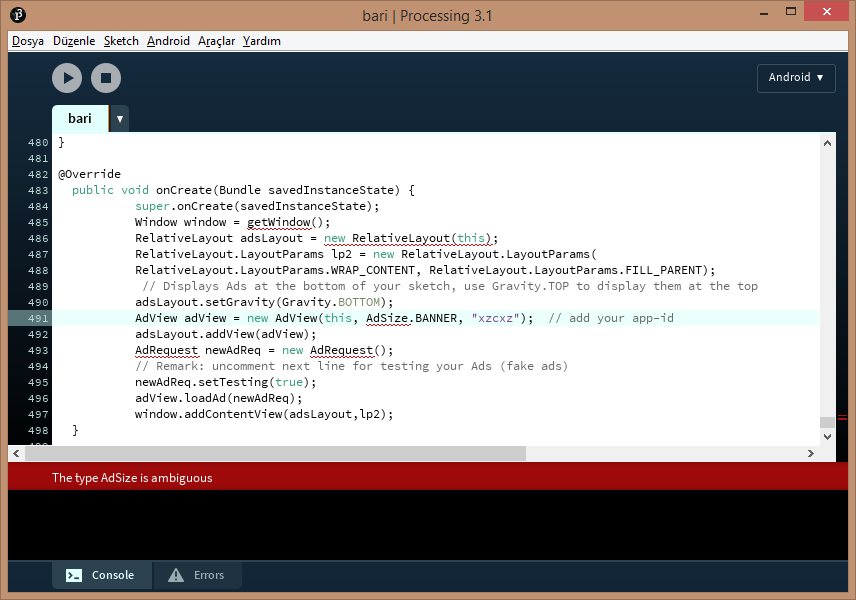
edit:
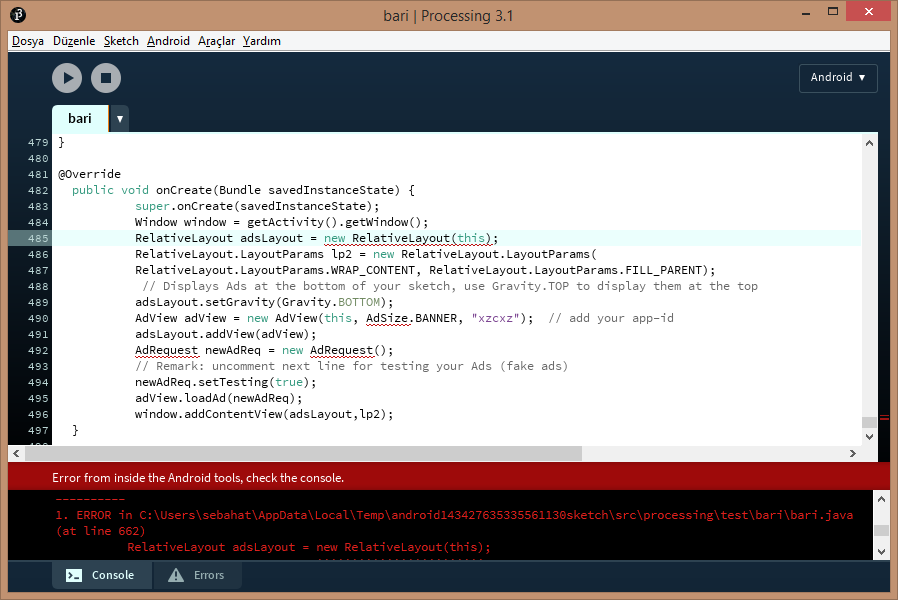
`
Hello i want to make an application with an android tablet an a pc , i want to sent the touch position to my principal program running on PC , the two are connected via usb . How can do that? thanks Yves , Guadeloupe
Hello. I have an idea of easy android aplication, but in Android -> Select device is nothing.
I use Android SDK download automaticlly with Processing. I also have USB Debugging turn on on my phone (Honor 3C).
When I start Processing in Android mode some errors apear in console:
Problem inside Devices.list()
java.io.IOException: Cannot run program "adb": CreateProcess error=2, Systém nem?že nalézt uvedený soubor
    at java.lang.ProcessBuilder.start(ProcessBuilder.java:1048)
    at java.lang.Runtime.exec(Runtime.java:620)
    at java.lang.Runtime.exec(Runtime.java:485)
    at processing.app.exec.ProcessHelper.execute(ProcessHelper.java:84)
    at processing.app.exec.ProcessHelper.execute(ProcessHelper.java:64)
    at processing.mode.android.AndroidSDK.runADB(AndroidSDK.java:453)
    at processing.mode.android.Devices.list(Devices.java:295)
    at processing.mode.android.Devices.refresh(Devices.java:239)
    at processing.mode.android.Devices.findMultiple(Devices.java:184)
    at processing.mode.android.AndroidEditor$UpdateDeviceListTask.run(AndroidEditor.java:83)
    at java.util.TimerThread.mainLoop(Timer.java:555)
    at java.util.TimerThread.run(Timer.java:505)
Caused by: java.io.IOException: CreateProcess error=2, Systém nem?že nalézt uvedený soubor
    at java.lang.ProcessImpl.create(Native Method)
    at java.lang.ProcessImpl.<init>(ProcessImpl.java:386)
    at java.lang.ProcessImpl.start(ProcessImpl.java:137)
    at java.lang.ProcessBuilder.start(ProcessBuilder.java:1029)
    ... 11 more
Have I done something incorrect? Or have I to do something more?
Thank you for answers.
` [dx] [dx] PARSE ERROR: [dx] unsupported class file version 52.0 [dx] ...while parsing ddf/minim/javasound/BasicMetaData.class [dx] 1 error; aborting
BUILD FAILED C:\Users\Fotsis\Documents\Processing\modes\AndroidMode\sdk\tools\ant\build.xml:888: The following error occurred while executing this line: C:\Users\Fotsis\Documents\Processing\modes\AndroidMode\sdk\tools\ant\build.xml:890: The following error occurred while executing this line: C:\Users\Fotsis\Documents\Processing\modes\AndroidMode\sdk\tools\ant\build.xml:902: The following error occurred while executing this line: C:\Users\Fotsis\Documents\Processing\modes\AndroidMode\sdk\tools\ant\build.xml:283: null returned: 1
Total time: 9 seconds `
I can't run my sketch on device.I tried first the example from Processing for Android tutorial and it worked,but when i try to run my own sketch through my phone ,this error comes up.Do you know how i can fix this?
I formatted my computer a few days ago. After that, my processing doesn't recognize any phone. Though my computer recognize my phone... I turned on the USB debugging which is in the developer options. How can I solve that?
Hi. a simple code to check the battery state worked in processing 2. it doesn't work anymore in processing 3 (my issue is I can't reinstall android mode in processing 2, the android mode doesn't appear in mode manager).
is this a known bug ? here's the code:
import android.content.BroadcastReceiver;
import android.content.Context;
import android.content.Intent;
import android.content.IntentFilter;
import android.os.Bundle;

int level=0;
int charging;
int voltage;
import android.os.BatteryManager;
int temp;
String tech;
void setup()
{
  battery_checking();
}
void draw()
{

}


void battery_checking()
{
  println("======================");
  println("Niveau Batterie :"+level+"% ");
  //  println("Technologie : "+tech);
  //  println("Voltage : "+voltage);
  //  println("Temperature : "+temp);
  //  println("plugged : "+charging);
  println("======================");
}


private BroadcastReceiver mBatInfoReceiver = new BroadcastReceiver() {

  @Override
    public void onReceive(Context c, Intent i) {


    level = i.getIntExtra("level", 0);
    voltage =  i.getIntExtra("voltage", 0);
    charging = i.getIntExtra("plugged", 0);
    tech = i.getStringExtra("technology");
    temp =  i.getIntExtra("temperature", 0);
  }
};

@Override
public void onCreate(Bundle savedInstanceState) {
  super.onCreate(savedInstanceState);
  registerReceiver(mBatInfoReceiver, new IntentFilter(Intent.ACTION_BATTERY_CHANGED));
}
thanks in advance !
Hello community.
I am a beginner of Processing and Android Mode. If I am doing something stupid, please bear with me.
I am trying to run a sketch on my android phone, however, Processing console told me "sketch launched on the device,,,,,OpenGL error 1280 at bot beginDraw(): invalid enum"
I then looked at the android device (the device is on Android 6.0), sketch is not runing. Everytime I tapped the sketch icon on the android device, Processing console keeps telling me "OpenGL error 1280 at bot beginDraw(): invalid enum"
Anyone had this problem?
P.S: I can run other other sketch on the same android device without problem. Processing v3.2.3 Android SDK API 7.1.1 (25);
Thank you for your help in advance.
here is the code which I am trying to run.
    import controlP5.*;
    float scale_factor = 1, depth;
    Photo2Mesh pm;
    int resolution;
    ControlP5 cp5;
    void setup() {
      size(600, 600, P3D);
      cp5 = new ControlP5(this);
      cp5.addSlider("depth").setPosition(20, 20).setRange(1, 50).setLabel("Depth");
      cp5.addSlider("resolution").setPosition(20, 80).setRange(2, 15).setLabel("Resolution").setValue(15);
      pm = new Photo2Mesh();
    }

    void draw() {
      background(0);

      hint(ENABLE_DEPTH_TEST);
      pushMatrix();
      translate(width/2, height/2);
      rotateX(radians(mouseX));
      rotateY(radians(mouseY));
      scale(scale_factor, scale_factor, scale_factor);
      pm.render_mesh(depth, resolution);
      popMatrix();
      hint(DISABLE_DEPTH_TEST);
      camera();
    }
Here is the class
    class Photo2Mesh {
      PImage img;
      int cols, rows, resolution, x_pos, y_pos, loc;
      float z, z_pos;
      color c;

      Photo2Mesh() {
        img = loadImage("https://processing.org/img/processing-handbook-second-edition.jpg");
        img.loadPixels();
      }

      void render_mesh(float z, int resolution) {
        this.z = z;
        this.resolution = resolution; // box size
        cols = img.width/resolution;
        rows = img.height/resolution;

        for (int x = 0; x < cols; x++) {
          for (int y = 0; y < rows; y++) {
            x_pos = x * resolution + resolution/2;
            y_pos = y * resolution + resolution/2;
            loc = x_pos + y_pos*img.width;
            c = img.pixels[loc];
            z_pos = map(brightness(img.pixels[loc]), 0, 255, 0, z);

            pushMatrix();
            translate(-width/2, -height/2);
            translate(x_pos, y_pos, z_pos);
            fill(c);
            noStroke();
            box(resolution, resolution, 160);
            popMatrix();
          }
        }
      }
    }
Hello I am making a fireworks project for android (like Daniel Schiffman) using processing 3.0 and android mode. I would like to play a sound when the firework explodes. How do I use the cassette library to play a .wav file.
void mousePressed () {
  fireworks.add(new Firework(mouseX));
  //Play Launch Sound
}
Please tell me me if you need more code.
Mac version, android 7.0
Hello hello ! A weird issue. I try to display images from picture folder of my android tablet..
I can display each name of file of the folder... But when I try to loadImage them, log tells me "Couldn't find the image ..."
It must be a simple stupid thing but I can't find it out... here's the code:
PImage img;
boolean FirstRun;
File images_dir=new File("/mnt/sdcard/Pictures/");
void setup()
{
  fullScreen();
  orientation(LANDSCAPE);
  FirstRun=true;
}

void draw()
{
  background(0, 0, 0);
  String [] images= images_dir.list();
  if (FirstRun) {
    for (String images_display : images)
    {
      println(images_display);
      img=loadImage(images_display);
      if (img!=null)   image(img, 0, 0);
      delay(5000);
    }
    FirstRun=false;
  }
}
thanks in advance for any help :-)
Hello How do i use share preferences to store an integer in processing for android. I don't have any libraries installed and when i say import android.content.SharedPreferences it gives me an error. Is there a function that is called when the program quits so I can update the stored integer in there? And how would i do that? And is there also a function that is called when the program starts? How can i update a variable from the value stored in the shared preferences. Thank you very much. Dan4o
Hello, I am very new to Android and Processing. The thing I am trying to do is. 1: App start on Android physical device with a default image. 2: User tap or press a button to choose an imag from Android device and replace the image from step 1, then, draw this selected image on Android device.
I am stuck here, since, Processing build in selectInput() does not work with Android mode, hence, I have to cook my own file chooser. Google the Android development, found something:
            private static final int READ_REQUEST_CODE = 42;
            /**
             * Fires an intent to spin up the "file chooser" UI and select an image.
             */

            public void performFileSearch() {

              // ACTION_OPEN_DOCUMENT is the intent to choose a file via the system's file
              // browser.
              Intent intent = new Intent(Intent.ACTION_OPEN_DOCUMENT);
              // Filter to only show results that can be "opened", such as a
              // file (as opposed to a list of contacts or timezones)
              intent.addCategory(Intent.CATEGORY_OPENABLE);

              // Filter to show only images, using the image MIME data type.
              // If one wanted to search for ogg vorbis files, the type would be "audio/ogg".
              // To search for all documents available via installed storage providers,
              // it would be "*/*".
              intent.setType("image/*");

              startActivityForResult(intent, READ_REQUEST_CODE);

              //Uri selectedImageUri = intent.getData();
              //docUri = DocumentsContract.buildDocumentUriUsingTree(selectedImageUri, DocumentsContract.getTreeDocumentId(selectedImageUri));

            }
but, when I paste this into processing (3.2.3) window, and imported the suggested lib, processing still gives me errors "The global variable "ACTION_OPEN_DOCUMENT" does not exit.
further reading android dev article,
            @Override
            public void onActivityResult(int requestCode, int resultCode,
                    Intent resultData) {

                // The ACTION_OPEN_DOCUMENT intent was sent with the request code
                // READ_REQUEST_CODE. If the request code seen here doesn't match, it's the
                // response to some other intent, and the code below shouldn't run at all.

                if (requestCode == READ_REQUEST_CODE && resultCode == Activity.RESULT_OK) {
                    // The document selected by the user won't be returned in the intent.
                    // Instead, a URI to that document will be contained in the return intent
                    // provided to this method as a parameter.
                    // Pull that URI using resultData.getData().
                    Uri uri = null;
                    if (resultData != null) {
                        uri = resultData.getData();
                        //Log.i(TAG, "Uri: " + uri.toString());
                        //showImage(uri);
                        path = uri.toString();//my edit
                        img = loadImage(path);// this is what I want.
                    }
                }
            }
how can I put above codes into a function processing sketch which can run on Android device?
I have been struggling with this "file chooser" for 3 days, please help.
Thank you for your help.
I already installed android studio 2.2.2.while going to locate the sdk for processing 3 ? it says un
How can i play a MP3 file in Android mode?
Are there libraries and/or examples for using Bluetooth BLE within the Processing Android mode? I did find a library in GitHub: "Bluetooth Low Energy for Processing Android" I couldn't see it in the Processing library list and before learning how to import and use it wondered if anyone else has tried it.
Thanks Peter
I read https://github.com/joshuajnoble/blepdroid to convert the rfduino library into .jar file and add it to processing libraries. I am very new to android and I did not understand how to extract the .jar file as mentioned on the link. Could anyone help me figure out how the get the .jar file for the rfduino library?
-Thanks Goutham