Quantcast
Channel: Android Mode - Processing 2.x and 3.x Forum
Viewing all 941 articles
Browse latest View live

Running sketches on my smartphone does not work anymore

$
0
0

Hello Processing community,

everytime I launch a sketch on my smartphone the sketch immediately stops and the message "[sketch name] stopped" pops up (on my smartphone, Samsung Galaxy S6, Android 6.0.1). A few days ago I didn't have this problem. I already tried:

  • restarting both my smartphone and desktop pc
  • reinstalling both Processing and the Android Mode (and the Android SDK)
  • using another account on my desktop pc

It doesn't matter what's inside the sketch, even an empty program or an Example by Processing don't work. Everything works fine on the Java Mode.

Please help me


Whatever I do, 'Select device' shows 'No connected devices'

$
0
0

Hi,

as far as I know I have done every required step to make the Android mode work (downloaded and installed the right SDK, enabled 'Developer Options' and 'USB debugging'), but still, all I get under 'Select device' is that there is no connected device available. I am using Windows 7, and it is indeed showing the attached Android device in Windows Explorer.

What could I do to solve this?

Thanks

Where can I find documentations and tutorials about 'Multitouch' for Android Mode 4.0+ ?

$
0
0

I want to get some information about the tool called "Touches array" showed in this example: [android.processing.org/reference/multitouch/touches.html]. Other informations about the reference for Android 4.0+ are also welcome.

Implementing ads with AdMob

$
0
0

So I recently uploaded my app to the play store and i wanted to implement ads, so I looked up this tutorial and It said I needed the AdMob library, so I went looking for it on the AdMob sites where they say I can get it with the google play service SDK which is great since I can download it with processing

I use the code that is used in the forum post which is this one:

import android.os.Bundle;
import android.view.Gravity;
import android.view.Window;
import android.widget.RelativeLayout;
import com.google.ads.*;

@ Override
public void onCreate(Bundle savedInstanceState) {
    super.onCreate(savedInstanceState);
    Window window = getWindow();
    RelativeLayout adsLayout = new RelativeLayout(this);
    RelativeLayout.LayoutParams lp2 = new RelativeLayout.LayoutParams(
        RelativeLayout.LayoutParams.WRAP_CONTENT, RelativeLayout.LayoutParams.FILL_PARENT);
    // Displays Ads at the bottom of your sketch, use Gravity.TOP to display them at the top
    adsLayout.setGravity(Gravity.BOTTOM);
    AdView adView = new AdView(this, AdSize.BANNER, "your-publisher-id");  // add your app-id
    adsLayout.addView(adView);
    AdRequest newAdReq = new AdRequest();
    // Remark: uncomment next line for testing your Ads (fake ads)
    //newAdReq.setTesting(true);
    adView.loadAd(newAdReq);
    window.addContentView(adsLayout,lp2);
}

but now the problem is that I got an error that says this: The import com.google cannot be resolved

and the console says this:

----------
1. WARNING in C:\Users\sjors\AppData\Local\Temp\android7328373206848409503sketch\src\processing\test\sketch_170817a\MainActivity.java (at line 9)
    import android.content.pm.PackageManager;
           ^^^^^^^^^^^^^^^^^^^^^^^^^^^^^^^^^
The import android.content.pm.PackageManager is never used
----------
2. WARNING in C:\Users\sjors\AppData\Local\Temp\android7328373206848409503sketch\src\processing\test\sketch_170817a\MainActivity.java (at line 11)
    import android.support.v4.content.ContextCompat;
           ^^^^^^^^^^^^^^^^^^^^^^^^^^^^^^^^^^^^^^^^
The import android.support.v4.content.ContextCompat is never used
----------
3. WARNING in C:\Users\sjors\AppData\Local\Temp\android7328373206848409503sketch\src\processing\test\sketch_170817a\MainActivity.java (at line 13)
    import android.app.AlertDialog;
           ^^^^^^^^^^^^^^^^^^^^^^^
The import android.app.AlertDialog is never used
----------
4. WARNING in C:\Users\sjors\AppData\Local\Temp\android7328373206848409503sketch\src\processing\test\sketch_170817a\MainActivity.java (at line 14)
    import android.content.DialogInterface;
           ^^^^^^^^^^^^^^^^^^^^^^^^^^^^^^^
The import android.content.DialogInterface is never used
----------
5. WARNING in C:\Users\sjors\AppData\Local\Temp\android7328373206848409503sketch\src\processing\test\sketch_170817a\MainActivity.java (at line 15)
    import android.Manifest;
           ^^^^^^^^^^^^^^^^
The import android.Manifest is never used
----------
6. WARNING in C:\Users\sjors\AppData\Local\Temp\android7328373206848409503sketch\src\processing\test\sketch_170817a\MainActivity.java (at line 49)
    int check;
        ^^^^^
The value of the local variable check is not used
----------
----------
7. ERROR in C:\Users\sjors\AppData\Local\Temp\android7328373206848409503sketch\src\processing\test\sketch_170817a\sketch_170817a.java (at line 13)
    import com.google.ads.*;
           ^^^^^^^^^^
The import com.google cannot be resolved
----------
8. ERROR in C:\Users\sjors\AppData\Local\Temp\android7328373206848409503sketch\src\processing\test\sketch_170817a\sketch_170817a.java (at line 14)
    import com.google.android.gms.ads.AdRequest;
           ^^^^^^^^^^
The import com.google cannot be resolved
----------
9. ERROR in C:\Users\sjors\AppData\Local\Temp\android7328373206848409503sketch\src\processing\test\sketch_170817a\sketch_170817a.java (at line 15)
    import com.google.android.gms.ads.AdView;
           ^^^^^^^^^^
The import com.google cannot be resolved
----------
10. ERROR in C:\Users\sjors\AppData\Local\Temp\android7328373206848409503sketch\src\processing\test\sketch_170817a\sketch_170817a.java (at line 16)
    import com.google.android.gms.ads.AdSize;
           ^^^^^^^^^^
The import com.google cannot be resolved
----------
11. ERROR in C:\Users\sjors\AppData\Local\Temp\android7328373206848409503sketch\src\processing\test\sketch_170817a\sketch_170817a.java (at line 17)
    import com.google.android.gms.ads.MobileAds;
           ^^^^^^^^^^
The import com.google cannot be resolved
----------
12. ERROR in C:\Users\sjors\AppData\Local\Temp\android7328373206848409503sketch\src\processing\test\sketch_170817a\sketch_170817a.java (at line 60)
    AdView adView = new AdView(this.getActivity());
    ^^^^^^
AdView cannot be resolved to a type
----------
13. ERROR in C:\Users\sjors\AppData\Local\Temp\android7328373206848409503sketch\src\processing\test\sketch_170817a\sketch_170817a.java (at line 60)
    AdView adView = new AdView(this.getActivity());
                        ^^^^^^
AdView cannot be resolved to a type
----------
14. ERROR in C:\Users\sjors\AppData\Local\Temp\android7328373206848409503sketch\src\processing\test\sketch_170817a\sketch_170817a.java (at line 61)
    adView.setAdSize(AdSize.BANNER);
                     ^^^^^^
AdSize cannot be resolved to a variable
----------
15. ERROR in C:\Users\sjors\AppData\Local\Temp\android7328373206848409503sketch\src\processing\test\sketch_170817a\sketch_170817a.java (at line 64)
    AdRequest newAdReq = new AdRequest.Builder()
    ^^^^^^^^^
AdRequest cannot be resolved to a type
----------
16. ERROR in C:\Users\sjors\AppData\Local\Temp\android7328373206848409503sketch\src\processing\test\sketch_170817a\sketch_170817a.java (at line 64)
    AdRequest newAdReq = new AdRequest.Builder()
                             ^^^^^^^^^
AdRequest cannot be resolved to a type
----------
16 problems (10 errors, 6 warnings)

BUILD FAILED
C:\Users\sjors\AppData\Local\Temp\android7328373206848409503sketch\build.xml:15: The following error occurred while executing this line:
C:\Users\sjors\AppData\Local\Temp\android7328373206848409503sketch\build.xml:28: Compile failed; see the compiler error output for details.

What did I do wrong I installed the google play service SDK through the default SDK manager.

Android mode: select input not working.. How can I dynamically load images?

$
0
0

Hi there!,

I was trying to use the selectInputfor loading an image in processing android mode and it didn't work. I also tried to use the SelectFile library, which is unfortunately not working with the latest processing.

any other libraries or methods to dynamically load image?

Any help would be much appreciated!

Thanks in advance :)

Too slow camera on android + ketai

$
0
0

Hi guys, i need a little help in a sketch i'm creating (sorry for my english, i'm brazilian). Ok, my sketch has to activate the camera and show the coordinates, however is very, very slow. I'm using my zenfone 3 with 4gb ram for tests.

Sorry for any error, first time using this forum This is the code:

 import ketai.camera.*;

  KetaiCamera cam;

   void iniciarCamera(int res_Width, int res_Height, int fps) {

   try{
     if(cam == null){
     cam = new KetaiCamera(this, res_Width, res_Height, fps);
    img = cam;
  }
} catch (Exception e){
    erroGeral+="Erro durante a inciação da camera. \n";
}
}

  void onCameraPreviewEvent()
 {
     cam.read();
  }

`

 String erroGeral = "";
  void setup() {
  size (750,480);      // Resolução do programa.
  orientation(LANDSCAPE);
  imageMode(CENTER);
  iniciarCamera(640,480,24);  //Resolução da qualidade da camera.
  initScanner();
}


 void draw() {
   if(erroGeral==null || erroGeral == ""){

   if (cam!= null && cam.isStarted()){
  //image(cam, width/2, height/2, width, height);
   //if (botaoPressionado){
     img = cam;
    //img.filter(THRESHOLD);
   // bs.imageFindBlobs(img);
    image(img, width/2, height/2, width, height);

   leitura();
 //}

} else {
  background(128);
  textSize(20);
  fill(255);
  text("Aguardando camera....toque para ativar.", 100, height/2);
}


  // Tratativa para Erros em geral (ajuda a localizar no código onde o erro se encontra)
} else {
  background(color(255,0,0));
  textSize(20);
  fill(255);
  text(erroGeral, 100, height/2);
   } // Fim da trativa de erro.
}

  private void leitura() {

    img.loadPixels();

    bs.findBlobs(img.pixels, img.width, img.height);
    bs.loadBlobsFeatures();
    bs.drawBox(boundingBoxCol, boundingBoxThickness);
    bs.weightBlobs(false);
    bs.findCentroids();

    for (int i = 0; i < bs.getBlobsNumber(); i++) {
      stroke(0, 255, 0);
      strokeWeight(2);
      fill(255);

      point(bs.getCentroidX(i), bs.getCentroidY(i));

      textFont((createFont("Calibri", 14, true)));
      text("x-> " + bs.getCentroidX(i) + "\ny-> " + bs.getCentroidY(i)+ "\nId-> "+ i, bs.getCentroidX(i)+30, bs.getCentroidY(i));

      if ((bs.getCentroidX(i) < blobrefX) && (bs.getCentroidY(i) < blobrefY)) {
        blobrefX = bs.getCentroidX(i);
        blobrefY = bs.getCentroidY(i);
        blobrefId = i;
      }

      if (!passos[1]){
        matrizBlob[0] = true;
      }

      if (i != blobrefId) {

        if (bs.getCentroidX(i) < blobrefX && bs.getCentroidY(i) > blobrefY-blobH && bs.getCentroidY(i) < blobrefY+blobH )
        {
          blobrefId = i;
          blobrefX = bs.getCentroidX(i);
          blobrefY = bs.getCentroidY(i);
          blobrefEsq = true;
          matrizBlob[0] = true;
          matrizBlob[1] = true;
          passos[0] = true;
        } else if (bs.getCentroidX(i) > blobrefX && bs.getCentroidY(i) > blobrefY-blobH && bs.getCentroidY(i) < blobrefY+blobH ) {
          blobrefEsq = true;
          matrizBlob[0] = true;
          matrizBlob[1] = true;
          passos[0] = true;
        } else if (bs.getCentroidX(i) < blobrefX-blobW*1.5 && bs.getCentroidY(i) > blobrefY+ blobH && !passos[0] ) {
          blobrefEsq = false;
          passos[1] = true;
          matrizBlob[0] = false;
          matrizBlob[1] = true;
          passos[2] = true;
        } else if (bs.getCentroidX(i) >= blobrefX-blobW && bs.getCentroidY(i) > blobrefY+ blobH && !passos[0] && !passos[2]) {
          matrizBlob[0] = true;
          matrizBlob[1] = false;
          //matrizBlob[3] = true;
          //blobrefEsq = true;
          //println("AAAAAAAAAAAAAAAAAAAAAAAAAAAAAAAAA");
        }


        if (blobrefEsq) {
          if (bs.getCentroidX(i) < blobrefX+blobW && bs.getCentroidY(i) > blobrefY+blobH && bs.getCentroidY(i)< blobrefY+3*blobH)   {matrizBlob[2] = true;}
          if (bs.getCentroidX(i) > blobrefX+blobW && bs.getCentroidY(i) > blobrefY+blobH && bs.getCentroidY(i)< blobrefY+3*blobH)   {matrizBlob[3] = true;}
          if (bs.getCentroidX(i) < blobrefX+blobW && bs.getCentroidY(i) > blobrefY+3*blobH && bs.getCentroidY(i)< blobrefY+7*blobH) {matrizBlob[4] = true;}
          if (bs.getCentroidX(i) > blobrefX+blobW && bs.getCentroidY(i) > blobrefY+3*blobH && bs.getCentroidY(i)< blobrefY+7*blobH) {matrizBlob[5] = true;}
        } else {
          if (bs.getCentroidX(i) < blobrefX-blobW && bs.getCentroidY(i) > blobrefY+blobH && bs.getCentroidY(i)< blobrefY+3*blobH)   {matrizBlob[2] = true;}
          if (bs.getCentroidX(i) > blobrefX-blobW && bs.getCentroidY(i) > blobrefY+blobH && bs.getCentroidY(i)< blobrefY+3*blobH)   {matrizBlob[3] = true;}
          if (bs.getCentroidX(i) < blobrefX-blobW && bs.getCentroidY(i) > blobrefY+3*blobH && bs.getCentroidY(i)< blobrefY+7*blobH) {matrizBlob[4] = true;}
          if (bs.getCentroidX(i) > blobrefX-blobW && bs.getCentroidY(i) > blobrefY+3*blobH && bs.getCentroidY(i)< blobrefY+7*blobH) {matrizBlob[5] = true;}
        }

      }
    println("ID REF: "+blobrefId+ "\n X REF:  "+blobrefX); // Debug
    }
   for (int p = 0; p <=  6; p++) {
     try {
       if (matrizBlob[p]) {

         testeAtivo+= (p)+"  ";        // Debug

         if (p == 0) {somaBlob += 1;}
         if (p == 1) {somaBlob += 2;}
         if (p == 2) {somaBlob += 4;}
         if (p == 3) {somaBlob += 8;}
         if (p == 4) {somaBlob += 16;}
         if (p == 5) {somaBlob += 32;}
        }
     } catch(IndexOutOfBoundsException e) {

       testeAtivo = "MUITOS PONTOS";
     }
}

    switch(somaBlob) {
      case 1:  letraBlob = "A";   break;
      case 5:  letraBlob = "B";   break;
      case 3:  letraBlob = "C";   break;
      case 11: letraBlob = "D";   break;
      case 9:  letraBlob = "E";   break;
      case 7:  letraBlob = "F";   break;
      case 15: letraBlob = "G";   break;
      case 13: letraBlob = "H";   break;
      case 6:  letraBlob = "I";   break;
      case 14: letraBlob = "J";   break;
      default: letraBlob = "NoN"; break;
}

VR menu Options not available

$
0
0

My process of Installation.

Download Processing 3.3.4-Windows64

Extract to a folder within User Directory

I did not AutoDownload the SDK, I had an SDK forder and specified directory.

SDK is outside of User Directory but still within access.

Added Android Mode 3.0.2

Update/Install Several packages in Android SDK package manager

Tested that an app can be made in processing and tested on phone using Getting Started.

http://android.processing.org/tutorials/getting_started/index.html

Downloaded AndroidMode4.0 beta3

https://github.com/processing/processing-android/releases/tag/android-262

Moved AndroidMode to modes of the processing directory after extracting Android-262.

Before Copy, only Java folder was available in the Modes directory.

Closed Processing, and opened again.

In android mode, on the Androids tab, everything that should be there, except for the app, wallpaper, watch face and Cardboard/VR.

I do not know what I am missing to get the VR option available in the menu. Any help is appreciated.

Processing Android Mode + Android Device + Bluetooth + Arduino

$
0
0

I usually create my own graphical user interface (custom design) to control an arduino via an android device using an android phone, wherein the GUI and communication was coded in processing android mode. But after upgrades done during the development of processing, a problem arise. The code that I created does not run the GUI on the later versions anymore.

My previous codes using Bluetooth communication was able and still is able to run in processing 2.0b6 and 2.0b7 (old dowloads). The problem on the codes started when I tested it with processing 2.2.1 (old download) states "that the package "android" does note exist". Also problems from existing later version, from processing 2.2.1(new download) untl the last version, states that there is an "error from inside the android tools, check the console".

This was test until February 2017.

I am still currently working on projects using the android device communicating with arduino via bluetooth, and it is still working perfectly. It was fortunate that I did not delete my old versions for testing my codes.

May I know, why did the foundation remove android packages in developing android device communicating via bluetooth? Or does the later versions require a procedure to install android packages.

Are there other ways wherein I could code bluetooth communication using a custom graphic user interface to communicate with arduino using the latest version of processing. Or are there any alternatives wherein I could code making android communicate with arduino designing my own GUI?


ANDROID MODE 0266 NOT WORK.

$
0
0

Im copy for the modes folder but i could only run the CM mode, who not allowed vr, that is what i m tryng to use any help will be appreciated, im very new here in this world

Is there anyone who has successfully implemented AdMob?

$
0
0

Is there anyone who has successfully implemented AdMob?

Problem with BluetoothAdapter class in processing 3

$
0
0

hi all ,

i'm trying to run the following code , but it says : 1-the class BluetoothAdapter doesn't exist
2-the class Bundle doesn't exist 3-the class Intent doesn't exist

the code is :

import android.content.Intent;
import android.os.Bundle;
import ketai.net.bluetooth.*;
import ketai.ui.*;
import ketai.net.*;
import ketai.camera.*;
import ketai.cv.facedetector.*;
import android.os.Environment;
import android.bluetooth.BluetoothAdapter;
import android.view.KeyEvent;


//__End of imports__//

BluetoothAdapter bluetooth = BluetoothAdapter.getDefaultAdapter();
KetaiBluetooth bt;

KetaiSimpleFace[] faces;
String directory;

KetaiCamera cam;

int posX,posY,i,info;
int pev_posX,pev_posY,pev_sec;
String cninfo = "";
boolean send_flag=true;


//**To start BT when app is launched**//
void onCreate(Bundle savedInstanceState) {
 super.onCreate(savedInstanceState);
 bt = new KetaiBluetooth(this);
}
void onActivityResult(int requestCode, int resultCode, Intent data) {
  bt.onActivityResult(requestCode, resultCode, data);
}
//__BT launched__//


//**To select bluetooth device if needed**// (not required for our program
void onKetaiListSelection(KetaiList klist)
{
 String selection = klist.getSelection();
 bt.connectToDeviceByName(selection);
 //dispose of list for now
 klist = null;
}
//__End of selection__//


//** To get data from blue tooth**/
void onBluetoothDataEvent(String who, byte[] data)
{
info = (data[0] & 0xFF) ;
}
//__data received_//


//**To get connection status**//
String getBluetoothInformation()
{
  String btInfo = "Connected to :";

  ArrayList<String> devices = bt.getConnectedDeviceNames();
  for (String device: devices)
  {
    btInfo+= device+"\n";
  }

  return btInfo;
}
//--connection status received_//


void settings()
{fullScreen(P2D);
}

void setup() {
  bt.start(); //start listening for BT connections
  bt.getPairedDeviceNames();
  bt.connectToDeviceByName("HC-05"); //Connect to our HC-06 bluetooth module
  delay(2000);
  stroke(0, 255, 0);
  strokeWeight(8);
  noFill();
  textSize(38);
  rectMode(CENTER);
  imageMode(CENTER);
  cam = new KetaiCamera(this, 320, 240, 24);
  directory = new String(Environment.getExternalStorageDirectory().getAbsolutePath());

  cam.setCameraID(0);
  cam.setSaveDirectory(directory);
  cam.setPhotoSize(1280,720);
  cam.autoSettings();

}

void draw() {

 if (cam != null)
 {
       if (!cam.isStarted())
       cam.start();

       image(cam, width/2, height/2, width, height); //display CAM on phone screen
       cam.loadPixels();

       faces = KetaiFaceDetector.findFaces(cam, 20);    //detect faces

       if(faces.length!=0) //if face found
       {
       println("Faces found: " + faces.length); //notify the face detection on console
        pev_posX=posX; posX = int(map(faces[0].location.x,20,300,1,100));
        pev_posY=posY; posY = int(map(faces[0].location.y,20,200,101,201));
        if(posX<=100 && posY>=101)
        {
        fill(#2C1BF5);
        textAlign(LEFT);
        text("X position(1-100): " + posX,(width/12),height/12);
        text("Y position(101-201): " + posY,(width/12),height/8);
        }
       }


        for ( i=0; i < faces.length; i++) // Box the faces and print its location
        {
        noFill();
        rect((faces[i].location.x)*width/320, (faces[i].location.y)*height/240, (2.5*faces[i].distance)*width/320, (3*faces[i].distance)*height/240);
        println(i,faces[i].location.x,faces[i].location.y);
        }


}

textfun();


  if (send_flag==true && faces.length!=0 && pev_sec!=second()) //we can send data
  {
    pev_sec=second();

  if (pev_posX==posX)
  {
    if (posX<40)
    {byte[] data = {'1'}; bt.broadcast(data); println("LEFT");}

    if (posX>60)
    {byte[] data = {'2'}; bt.broadcast(data); println("RIGHT");}
  }
  delay(500);
    if (pev_posY==posY)
  {
    if (posY<140)
    {byte[] data = {'3'}; bt.broadcast(data); println("UP");}

    if (posY>160)
    {byte[] data = {'4'}; bt.broadcast(data); println("DOWN");}
  }

  if (posX>40 && posX<60 && posY>140 &&posY<160)
  {byte[] data = {'5'}; bt.broadcast(data); println("No Change");}

send_flag=false;
println("send from BT");
  }

  if (pev_sec!=second())
  send_flag=true;


}


void onCameraPreviewEvent()
{
  cam.read();
}


void onSavePhotoEvent( String filename) {
 cam.addToMediaLibrary(filename);
 textAlign(CENTER);
}

public void mousePressed(){
  cam.savePhoto("CD_selfie.jpg");
  text("Photo captured",width/2,height/2);
  delay(2000);
}

void textfun()
{
  textSize(30);
  textAlign(CENTER);
  fill(255);
  cninfo = getBluetoothInformation();    //get connection information status
  text(cninfo,width/2,height-height/1.03);
  noFill();
}

what could be the problem , please help me

Kind regards

heart rate monitor code

Can i zoom in and out with vr?

$
0
0

hello everyone, im doing an experimentation with vr in the android mode. I could make it run on cell fone but it looses the "peasyCam" functionality, that make everything cooler. im just wondering if has a way to implement something whit that functionality? any help will be gratefull,

Looking for net library alternative

$
0
0

Hello guys, With a friend of mine I am working on a telemetry system for my sailing classes. The components exchange their data via JSON on WiFi TCP massages.

The communication allready works fine and even sharing the data with a processing desktop application works but I planed to use a Android device to visualize the data online during the lessons.

I noticed that the net library does not exists in the Android mode and I found the OscP5 as well as the ketai library which shall include a TCP client class. I look through the examples but just found one in OscP5 but the example wouldn't work on my Nexus an the TCP server on my network. I am not sure whether it is because the Osc massage protocol or the TCP connection. My idea was to use the netP5 library which lies underneath oscP5 to establish the connection without the Osc stuff and unpack them with the JSON object. But I was not able to find examples how to use this lib.

Has anyone experience with the netP5 library and can help me? Or does anyone know another way to connect a processing app to the TCP server?

Is there any way to get the GPS location of a device using Processing?

$
0
0

I want to send it to another device to be used by my application.


Soooo many problems...

$
0
0

So. New forum. First post. Frustrated.

I don't claim to write clean code, but I try to make it readable. I started programming somewhere in the 80s, in BASIC, then in C, C++, whatever. I love global variables, I can do Object Oriented. I was looking for a way to program in Java directly on Android, with the result being an APK. So I came to Processing. Hm. I would have made APDE as some kind of dual-mode tool chain, where one mode is the basic "Go and write processing" and the other mode as "programm natively, use P as import, do your own main without overriding", but that's just me and outside the scope of what I'm trying to do here.

First I went ahead and grabbed me android's sensors just to see if I could. I made my own sensor class, grabbed temperature from the battery manager, made another class (batman), registered some callbacks, put them on screen, added a background. Worked.

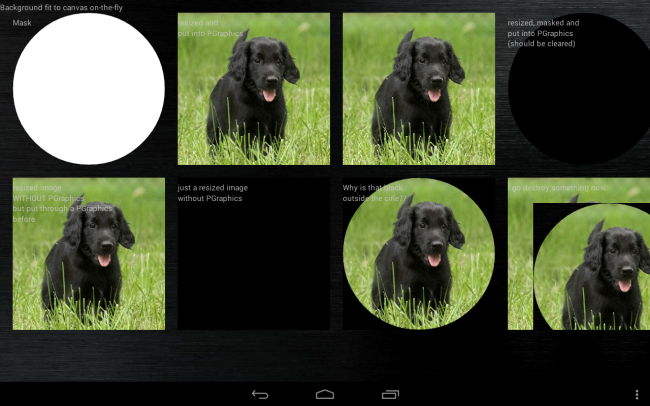
I started grabbing touch input as mouse input, worked just fine. Wanted to text() on a PGraphics to help debug. Easy-peasy. Make a PGraphics, text in, display it by image(..), clear() it, text in, display, clear, rinse, repeat. Huh. What's that? the text overwrites and overwrites and overwrites (I was grabbing touch position, fingerdown, fingerup, worked like a charm.) but wasn't clearing. I wanted to re-use the PGraphics with clear() because creating a new one 30x per second is not the way to go, right? But no, clear() does nothing but put a new "backround" on top, full black, fully transparent. On top. Yeah, you read that right. Took me 4 hours of my life and diving into Processing on github. (censored). By the way, whenever someone on github or here found some problem with clear() and pgraphics, the comments are a hoot. Yeah, I can reproduce it. No, I will not loop over 300,000 pixels to reset them 30 times a second, thanks for recommending. Even the clear() example right in the procesing reference (modified to draw on touch, clear on finger-up) does not work on Android. Let me repeat that: IT DOES NOT WORK. Want a (censored) video?

Next, with a lightsensor running, I wanted to build some photographer's helper. Some overlaying rotating discs, aperture, shutter speed, a draggable ISO selector... Let's start with a disc. Made me some nice square metal plate, read some more. Either I take it and mask it with something round to get a disc, or I apply it as a texture onto a circle. Since my first hour trying to texture(...) resp. setTexture(...) somehow failed to bring results, and I saw that masking was the obviously preferred way to go in the forum, I went down that rabbithole.

Screenshot_2017-09-02-17-10-38

Want some code? You get some code.

import android.os.Bundle;
import android.os.Build;
import android.app.Activity;
import android.content.Context;
import android.view.WindowManager;
import android.view.Display;

Activity activity;
Context context;
Display display;

int rotation;
String rotString;
String orientation;
float aspectRatio;

int canvasX;
int canvasY;
int fontSizeNormal = 5;
int colWidth;
int rowHeight;
int rows;
int cols;
int gridUnitX;
int gridUnitY;

float fScale;
int iScale;

int i;
int loopcount = 0;

PGraphics backgroundG;
PGraphics maskG;
PGraphics balouG;
PGraphics balouMaskedG;
PGraphics testG;
PGraphics jerkG;

PImage bgIMG;
PImage testIMG;
PImage balouIMG;
PImage balouorigIMG;
PImage cJerkIMG;

public void setup() {
  //fullScreen();

  //orientation(PORTRAIT);

  size(displayWidth, displayHeight, P2D);
  frameRate(30);

  background(0,0,0);

  canvasX = displayWidth;
  canvasY = displayHeight;
  activity = this.getActivity();
  context = activity.getApplicationContext();

  display = ((WindowManager) context.getSystemService(Context.WINDOW_SERVICE)).getDefaultDisplay();

  fontSizeNormal = int(float(canvasX)/18);
  rows = 2; cols = 3;
  gridUnitX = int(float(canvasX) / 11);
  gridUnitY = int(float(canvasY) / 14);

  fScale = canvasX / 1000;
  iScale = int(fScale);

  backgroundG = createGraphics(canvasX, canvasY);
  bgIMG = loadImage("background.jpg");
  while (bgIMG.width == 0) { delay(100); }
  backgroundG.beginDraw();
  backgroundG.image(bgIMG,0,0,canvasX, canvasY);  // fit to canvas on-the-fly
  backgroundG.endDraw();

  image(backgroundG,0,0);  // let's get this out of the way


  balouG = createGraphics(300, 300);
  balouorigIMG = loadImage("balou.jpg");
  while (balouorigIMG.width == 0) { delay(100); }
  balouorigIMG.resize(300,300);  // resize it
  balouG.beginDraw();
  balouG.image(balouorigIMG,0,0);  // and put it in the upper left corner of PGraphics balouG
  balouG.endDraw();

  maskG = createGraphics(300,300);
  maskG.beginDraw();
  maskG.ellipse(150, 150, 300, 300);  // nice white circle
  maskG.endDraw();

  balouMaskedG = createGraphics(300, 300);
  balouIMG = loadImage("balou.jpg");
  while (balouIMG.width == 0) { delay(100); }
  balouIMG.resize(300,300);           // if I don't resize here,
  balouIMG.mask(maskG);               // I get an error that the mask doesn't fit the image
  balouMaskedG.beginDraw();           // so something happens in resize(int, int)
  balouMaskedG.image(balouIMG,0,0);   // but what?!?
  balouMaskedG.endDraw();

  // and just for the heck of it:
  balouMaskedG.clear();       // outside a beginDraw/endDraw
  balouMaskedG.beginDraw();
  balouMaskedG.clear();       // inside a beginDraw/endDraw
  balouMaskedG.endDraw();
  // at least one of those should return balouMaskedG to a completely transparent state.
  // if you check the Processing -> Android port's source, you should immediately see why that fails.

  testG = createGraphics(300, 300);
  testIMG = loadImage("balou.jpg");
  while (testIMG.width == 0) { delay(100); }
  testG.beginDraw();
  testG.image(testIMG,0,0,300,300);  // fit to 300x300 canvas
  testG.endDraw();

  // Afterthought:
  testIMG.resize(300,300);   // should work just fine, right?

  jerkG = createGraphics(300, 300);
  cJerkIMG = loadImage("balou.jpg");
  while (cJerkIMG.width == 0) { delay(100); }
  cJerkIMG.resize(300,300);  // resize it
  jerkG.beginDraw();
  jerkG.image(cJerkIMG,0,0);  // and put it in the upper left corner of PGraphics
  cJerkIMG.mask(maskG);
  jerkG.image(cJerkIMG,50,50);  // and NOT put it in the upper left corner of PGraphics
  jerkG.clear(); // does nothing
  jerkG.endDraw();
  jerkG.clear(); // still does nothing

  loop();
}


public void draw() {
  textSize(15);
  fill(200,200,200);

  background(0);          // black is beautiful

  image(backgroundG,0,0);  // nicely stretched background
  text("Background fit to canvas on-the-fly",0,20);

  image(maskG,25,25);   // white circle
  text("Mask",25,50);

  image(balouG,350,25); // nicely resized PGraphics
  text("resized and\nput into PGraphics",350,50);

  image(testG,675,25);  // nicely resized PGraphics
  text("on-the-fly-resize while\nput into PGraphics",50,375);

  image(balouMaskedG,1000,25); //gives a black circle?!?
  text("resized, masked and\nput into PGraphics\n(should be cleared)",1000,50);

  image(balouorigIMG,25, 350);
  text("resized image\nWITHOUT PGraphics\nbut put through a PGraphics\nbefore",25,375);

  image(testIMG,350,350);  //
  text("just a resized image\nwithout PGraphics",350,375);

  image(cJerkIMG,675,350); //
  text("Why is that black\noutside the cirle??",675,375);

  image(jerkG,1000,350); //
  text("I go destroy something now.",1000,375);

} // last line of draw()

Sorry for those seemingly random missing linebreaks, we have some translation error here(LF/CRLF stuff, old but gold). Also, there are a lot of unused vars, as I yanked that out of the lightmeter sketch and expanded on it.

Anyways. Now, if I resize a loaded image, it'll be black unless I draw it into a PGraphics? Really? And the mask does nothing unless I put the masked image through a PGraphics, and then the background is black? Why? I feel like Del Shannon crying Why why why why why in"Runaway".

And don't even get me started on lines in the console, like "The pixel array has a length of 90000, but it should be at least 184041" So, who made that pixel array too small?

Flame me, boot me, whatever, but this needed out, I already had one heart attack, I don't need another one. You need one non-300x300px image to test that code yourself.
Android SDK Failed to load

$
0
0

I installed Processing 3.3.5 and Android Mode v4 (Final release) with Android API 26. It says that Android mode will be disabled because Android SDK was found but there are some missing files, same thing happens with Android API 25.

Alternative to exit() in androidMode 4.0.

$
0
0

I have updated to the lastest androidMode version, which is supposed to be compatible with Processing 3.1+.

The problem occurs every time I want to run a sketch that uses exit(). This is the error I am being shown:

1. ERROR in C:\Users\xxs4n\AppData\Local\Temp\android8325461978585377780sketch\app\src\main\java\processing\test\xd_1_1_2\xD_1_1_2.java (at line 225)
    exit();
    ^^^^
The method exit() is undefined for the type xD_1_1_2.gameManager
----------
1 problem (1 error)
 FAILED

FAILURE: Build failed with an exception.

* Where:
Build file 'C:\Users\xxs4n\AppData\Local\Temp\android8325461978585377780sketch\app\build.gradle' line: 62

* What went wrong:
Execution failed for task ':app:compileDebugJavaWithJavac'.
> Process 'command 'C:\Program Files (x86)\processing-3.3.5-windows64\java\bin\java.exe'' finished with non-zero exit value -1

* Try:
Run with --stacktrace option to get the stack trace. Run with --info or --debug option to get more log output.

BUILD FAILED in 6s
26 actionable tasks: 26 executed
org.gradle.tooling.BuildException: Could not execute build using Gradle distribution 'https://services.gradle.org/distributions/gradle-4.0-bin.zip'.
    at org.gradle.tooling.internal.consumer.ExceptionTransformer.transform(ExceptionTransformer.java:51)
    at org.gradle.tooling.internal.consumer.ExceptionTransformer.transform(ExceptionTransformer.java:29)
    at org.gradle.tooling.internal.consumer.ResultHandlerAdapter.onFailure(ResultHandlerAdapter.java:41)
    at org.gradle.tooling.internal.consumer.async.DefaultAsyncConsumerActionExecutor$1$1.run(DefaultAsyncConsumerActionExecutor.java:57)
    at org.gradle.internal.concurrent.ExecutorPolicy$CatchAndRecordFailures.onExecute(ExecutorPolicy.java:63)
    at org.gradle.internal.concurrent.StoppableExecutorImpl$1.run(StoppableExecutorImpl.java:46)
    at java.util.concurrent.ThreadPoolExecutor.runWorker(ThreadPoolExecutor.java:1142)
    at java.util.concurrent.ThreadPoolExecutor$Worker.run(ThreadPoolExecutor.java:617)
    at org.gradle.internal.concurrent.ThreadFactoryImpl$ManagedThreadRunnable.run(ThreadFactoryImpl.java:55)
    at java.lang.Thread.run(Thread.java:748)
    at org.gradle.tooling.internal.consumer.BlockingResultHandler.getResult(BlockingResultHandler.java:46)
    at org.gradle.tooling.internal.consumer.DefaultBuildLauncher.run(DefaultBuildLauncher.java:77)
    at processing.mode.android.AndroidBuild.gradleBuild(AndroidBuild.java:265)
    at processing.mode.android.AndroidBuild.build(AndroidBuild.java:201)
    at processing.mode.android.AndroidMode.handleRunDevice(AndroidMode.java:315)
    at processing.mode.android.AndroidEditor$15.run(AndroidEditor.java:373)
Caused by: org.gradle.internal.exceptions.LocationAwareException: Build file 'C:\Users\xxs4n\AppData\Local\Temp\android8325461978585377780sketch\app\build.gradle' line: 62
Execution failed for task ':app:compileDebugJavaWithJavac'.
    at org.gradle.initialization.DefaultExceptionAnalyser.transform(DefaultExceptionAnalyser.java:74)
    at org.gradle.initialization.MultipleBuildFailuresExceptionAnalyser.transform(MultipleBuildFailuresExceptionAnalyser.java:47)
    at org.gradle.initialization.StackTraceSanitizingExceptionAnalyser.transform(StackTraceSanitizingExceptionAnalyser.java:30)
    at org.gradle.initialization.DefaultGradleLauncher$1.run(DefaultGradleLauncher.java:124)
    at org.gradle.internal.work.DefaultWorkerLeaseService$2.execute(DefaultWorkerLeaseService.java:124)
    at org.gradle.initialization.DefaultGradleLauncher.doBuild(DefaultGradleLauncher.java:116)
    at org.gradle.initialization.DefaultGradleLauncher.run(DefaultGradleLauncher.java:99)
    at org.gradle.launcher.exec.GradleBuildController.run(GradleBuildController.java:66)
    at org.gradle.tooling.internal.provider.runner.BuildModelActionRunner.run(BuildModelActionRunner.java:50)
    at org.gradle.launcher.exec.ChainingBuildActionRunner.run(ChainingBuildActionRunner.java:35)
    at org.gradle.launcher.exec.ChainingBuildActionRunner.run(ChainingBuildActionRunner.java:35)
    at org.gradle.tooling.internal.provider.ValidatingBuildActionRunner.run(ValidatingBuildActionRunner.java:32)
    at org.gradle.launcher.exec.RunAsBuildOperationBuildActionRunner$1.run(RunAsBuildOperationBuildActionRunner.java:43)
    at org.gradle.internal.progress.DefaultBuildOperationExecutor$RunnableBuildOperationWorker.execute(DefaultBuildOperationExecutor.java:317)
    at org.gradle.internal.progress.DefaultBuildOperationExecutor$RunnableBuildOperationWorker.execute(DefaultBuildOperationExecutor.java:309)
    at org.gradle.internal.progress.DefaultBuildOperationExecutor.execute(DefaultBuildOperationExecutor.java:185)
    at org.gradle.internal.progress.DefaultBuildOperationExecutor.run(DefaultBuildOperationExecutor.java:95)
    at org.gradle.launcher.exec.RunAsBuildOperationBuildActionRunner.run(RunAsBuildOperationBuildActionRunner.java:40)
    at org.gradle.tooling.internal.provider.SubscribableBuildActionRunner.run(SubscribableBuildActionRunner.java:51)
    at org.gradle.launcher.exec.InProcessBuildActionExecuter.execute(InProcessBuildActionExecuter.java:44)
    at org.gradle.launcher.exec.InProcessBuildActionExecuter.execute(InProcessBuildActionExecuter.java:28)
    at org.gradle.tooling.internal.provider.ContinuousBuildActionExecuter.execute(ContinuousBuildActionExecuter.java:75)
    at org.gradle.tooling.internal.provider.ContinuousBuildActionExecuter.execute(ContinuousBuildActionExecuter.java:49)
    at org.gradle.tooling.internal.provider.ServicesSetupBuildActionExecuter.execute(ServicesSetupBuildActionExecuter.java:51)
    at org.gradle.tooling.internal.provider.ServicesSetupBuildActionExecuter.execute(ServicesSetupBuildActionExecuter.java:32)
    at org.gradle.tooling.internal.provider.GradleThreadBuildActionExecuter.execute(GradleThreadBuildActionExecuter.java:36)
    at org.gradle.tooling.internal.provider.GradleThreadBuildActionExecuter.execute(GradleThreadBuildActionExecuter.java:25)
    at org.gradle.tooling.internal.provider.StartParamsValidatingActionExecuter.execute(StartParamsValidatingActionExecuter.java:64)
    at org.gradle.tooling.internal.provider.StartParamsValidatingActionExecuter.execute(StartParamsValidatingActionExecuter.java:29)
    at org.gradle.tooling.internal.provider.SessionFailureReportingActionExecuter.execute(SessionFailureReportingActionExecuter.java:55)
    at org.gradle.tooling.internal.provider.SessionFailureReportingActionExecuter.execute(SessionFailureReportingActionExecuter.java:42)
    at org.gradle.tooling.internal.provider.SetupLoggingActionExecuter.execute(SetupLoggingActionExecuter.java:50)
    at org.gradle.tooling.internal.provider.SetupLoggingActionExecuter.execute(SetupLoggingActionExecuter.java:30)
    at org.gradle.launcher.daemon.server.exec.ExecuteBuild.doBuild(ExecuteBuild.java:67)
    at org.gradle.launcher.daemon.server.exec.BuildCommandOnly.execute(BuildCommandOnly.java:36)
    at org.gradle.launcher.daemon.server.api.DaemonCommandExecution.proceed(DaemonCommandExecution.java:120)
    at org.gradle.launcher.daemon.server.exec.WatchForDisconnection.execute(WatchForDisconnection.java:37)
    at org.gradle.launcher.daemon.server.api.DaemonCommandExecution.proceed(DaemonCommandExecution.java:120)
    at org.gradle.launcher.daemon.server.exec.ResetDeprecationLogger.execute(ResetDeprecationLogger.java:26)
    at org.gradle.launcher.daemon.server.api.DaemonCommandExecution.proceed(DaemonCommandExecution.java:120)
    at org.gradle.launcher.daemon.server.exec.RequestStopIfSingleUsedDaemon.execute(RequestStopIfSingleUsedDaemon.java:34)
    at org.gradle.launcher.daemon.server.api.DaemonCommandExecution.proceed(DaemonCommandExecution.java:120)
    at org.gradle.launcher.daemon.server.exec.ForwardClientInput$2.call(ForwardClientInput.java:74)
    at org.gradle.launcher.daemon.server.exec.ForwardClientInput$2.call(ForwardClientInput.java:72)
    at org.gradle.util.Swapper.swap(Swapper.java:38)
    at org.gradle.launcher.daemon.server.exec.ForwardClientInput.execute(ForwardClientInput.java:72)
    at org.gradle.launcher.daemon.server.api.DaemonCommandExecution.proceed(DaemonCommandExecution.java:120)
    at org.gradle.launcher.daemon.server.exec.LogAndCheckHealth.execute(LogAndCheckHealth.java:55)
    at org.gradle.launcher.daemon.server.api.DaemonCommandExecution.proceed(DaemonCommandExecution.java:120)
    at org.gradle.launcher.daemon.server.exec.LogToClient.doBuild(LogToClient.java:62)
    at org.gradle.launcher.daemon.server.exec.BuildCommandOnly.execute(BuildCommandOnly.java:36)
    at org.gradle.launcher.daemon.server.api.DaemonCommandExecution.proceed(DaemonCommandExecution.java:120)
    at org.gradle.launcher.daemon.server.exec.EstablishBuildEnvironment.doBuild(EstablishBuildEnvironment.java:72)
    at org.gradle.launcher.daemon.server.exec.BuildCommandOnly.execute(BuildCommandOnly.java:36)
    at org.gradle.launcher.daemon.server.api.DaemonCommandExecution.proceed(DaemonCommandExecution.java:120)
    at org.gradle.launcher.daemon.server.exec.StartBuildOrRespondWithBusy$1.run(StartBuildOrRespondWithBusy.java:50)
    at org.gradle.launcher.daemon.server.DaemonStateCoordinator$1.run(DaemonStateCoordinator.java:297)
    at org.gradle.internal.concurrent.ExecutorPolicy$CatchAndRecordFailures.onExecute(ExecutorPolicy.java:63)
    at org.gradle.internal.concurrent.StoppableExecutorImpl$1.run(StoppableExecutorImpl.java:46)
    at org.gradle.internal.concurrent.ThreadFactoryImpl$ManagedThreadRunnable.run(ThreadFactoryImpl.java:55)
Caused by: org.gradle.api.tasks.TaskExecutionException: Execution failed for task ':app:compileDebugJavaWithJavac'.
    at org.gradle.api.internal.tasks.execution.ExecuteActionsTaskExecuter.executeActions(ExecuteActionsTaskExecuter.java:100)
    at org.gradle.api.internal.tasks.execution.ExecuteActionsTaskExecuter.execute(ExecuteActionsTaskExecuter.java:70)
    at org.gradle.api.internal.tasks.execution.SkipUpToDateTaskExecuter.execute(SkipUpToDateTaskExecuter.java:64)
    at org.gradle.api.internal.tasks.execution.ResolveTaskOutputCachingStateExecuter.execute(ResolveTaskOutputCachingStateExecuter.java:54)
    at org.gradle.api.internal.tasks.execution.ValidatingTaskExecuter.execute(ValidatingTaskExecuter.java:58)
    at org.gradle.api.internal.tasks.execution.SkipEmptySourceFilesTaskExecuter.execute(SkipEmptySourceFilesTaskExecuter.java:88)
    at org.gradle.api.internal.tasks.execution.ResolveTaskArtifactStateTaskExecuter.execute(ResolveTaskArtifactStateTaskExecuter.java:52)
    at org.gradle.api.internal.tasks.execution.SkipTaskWithNoActionsExecuter.execute(SkipTaskWithNoActionsExecuter.java:52)
    at org.gradle.api.internal.tasks.execution.SkipOnlyIfTaskExecuter.execute(SkipOnlyIfTaskExecuter.java:54)
    at org.gradle.api.internal.tasks.execution.ExecuteAtMostOnceTaskExecuter.execute(ExecuteAtMostOnceTaskExecuter.java:43)
    at org.gradle.api.internal.tasks.execution.CatchExceptionTaskExecuter.execute(CatchExceptionTaskExecuter.java:34)
    at org.gradle.execution.taskgraph.DefaultTaskGraphExecuter$EventFiringTaskWorker$1.run(DefaultTaskGraphExecuter.java:242)
    at org.gradle.internal.progress.DefaultBuildOperationExecutor$RunnableBuildOperationWorker.execute(DefaultBuildOperationExecutor.java:317)
    at org.gradle.internal.progress.DefaultBuildOperationExecutor$RunnableBuildOperationWorker.execute(DefaultBuildOperationExecutor.java:309)
    at org.gradle.internal.progress.DefaultBuildOperationExecutor.execute(DefaultBuildOperationExecutor.java:185)
    at org.gradle.internal.progress.DefaultBuildOperationExecutor.run(DefaultBuildOperationExecutor.java:95)
    at org.gradle.execution.taskgraph.DefaultTaskGraphExecuter$EventFiringTaskWorker.execute(DefaultTaskGraphExecuter.java:235)
    at org.gradle.execution.taskgraph.DefaultTaskGraphExecuter$EventFiringTaskWorker.execute(DefaultTaskGraphExecuter.java:224)
    at org.gradle.execution.taskgraph.DefaultTaskPlanExecutor$TaskExecutorWorker.processTask(DefaultTaskPlanExecutor.java:121)
    at org.gradle.execution.taskgraph.DefaultTaskPlanExecutor$TaskExecutorWorker.access$200(DefaultTaskPlanExecutor.java:77)
    at org.gradle.execution.taskgraph.DefaultTaskPlanExecutor$TaskExecutorWorker$1.execute(DefaultTaskPlanExecutor.java:102)
    at org.gradle.execution.taskgraph.DefaultTaskPlanExecutor$TaskExecutorWorker$1.execute(DefaultTaskPlanExecutor.java:96)
    at org.gradle.execution.taskgraph.DefaultTaskExecutionPlan.execute(DefaultTaskExecutionPlan.java:612)
    at org.gradle.execution.taskgraph.DefaultTaskExecutionPlan.executeWithTask(DefaultTaskExecutionPlan.java:567)
    at org.gradle.execution.taskgraph.DefaultTaskPlanExecutor$TaskExecutorWorker.run(DefaultTaskPlanExecutor.java:96)
    ... 3 more
Caused by: org.gradle.process.internal.ExecException: Process 'command 'C:\Program Files (x86)\processing-3.3.5-windows64\java\bin\java.exe'' finished with non-zero exit value -1
    at org.gradle.process.internal.DefaultExecHandle$ExecResultImpl.assertNormalExitValue(DefaultExecHandle.java:370)
    at org.gradle.process.internal.DefaultJavaExecAction.execute(DefaultJavaExecAction.java:31)
    at org.gradle.api.internal.file.DefaultFileOperations.javaexec(DefaultFileOperations.java:176)
    at org.gradle.api.internal.project.DefaultProject.javaexec(DefaultProject.java:1061)
    at org.gradle.groovy.scripts.DefaultScript.javaexec(DefaultScript.java:235)
    at org.gradle.internal.metaobject.BeanDynamicObject$MetaClassAdapter.invokeMethod(BeanDynamicObject.java:479)
    at org.gradle.internal.metaobject.BeanDynamicObject.tryInvokeMethod(BeanDynamicObject.java:191)
    at org.gradle.groovy.scripts.BasicScript$ScriptDynamicObject.tryInvokeMethod(BasicScript.java:130)
    at org.gradle.internal.metaobject.ConfigureDelegate.invokeMethod(ConfigureDelegate.java:80)
    at org.gradle.internal.metaobject.BeanDynamicObject$GroovyObjectAdapter.invokeOpaqueMethod(BeanDynamicObject.java:579)
    at org.gradle.internal.metaobject.BeanDynamicObject$MetaClassAdapter.invokeMethod(BeanDynamicObject.java:506)
    at org.gradle.internal.metaobject.BeanDynamicObject.tryInvokeMethod(BeanDynamicObject.java:191)
    at org.gradle.internal.metaobject.ConfigureDelegate.invokeMethod(ConfigureDelegate.java:80)
    at build_eafr1p7ebkiyrqiay1hjyj7bq$_run_closure1$_closure5$_closure8.doCall(C:\Users\xxs4n\AppData\Local\Temp\android8325461978585377780sketch\app\build.gradle:62)
    at org.gradle.api.internal.AbstractTask$ClosureTaskAction.execute(AbstractTask.java:670)
    at org.gradle.api.internal.AbstractTask$ClosureTaskAction.execute(AbstractTask.java:651)
    at org.gradle.api.internal.tasks.execution.ExecuteActionsTaskExecuter$1.run(ExecuteActionsTaskExecuter.java:122)
    at org.gradle.internal.progress.DefaultBuildOperationExecutor$RunnableBuildOperationWorker.execute(DefaultBuildOperationExecutor.java:317)
    at org.gradle.internal.progress.DefaultBuildOperationExecutor$RunnableBuildOperationWorker.execute(DefaultBuildOperationExecutor.java:309)
    at org.gradle.internal.progress.DefaultBuildOperationExecutor.execute(DefaultBuildOperationExecutor.java:185)
    at org.gradle.internal.progress.DefaultBuildOperationExecutor.run(DefaultBuildOperationExecutor.java:95)
    at org.gradle.api.internal.tasks.execution.ExecuteActionsTaskExecuter.executeAction(ExecuteActionsTaskExecuter.java:111)
    at org.gradle.api.internal.tasks.execution.ExecuteActionsTaskExecuter.executeActions(ExecuteActionsTaskExecuter.java:92)
    ... 27 more

Is there another function I must use in order to stop an app?

Midi sequencer android porting issue

$
0
0

Hi there, I would like to convert the following midi sequencer to android An error occurred; Failed resolution of: Ljavax/sound/midi/MidiSystem I think something wrong around MidiBus, The sketch never open it's self on my phone. There is someone who could help me?

Thanks a lot! Giammy

import controlP5.*;
import themidibus.*;
int outDeviceNum = 1;
MidiBus midiBus;
ControlP5 cp5;
Knob myKnobA;


int col = color(255);
int slot = 16;
IntList inv;
int[] t = new int [16];
boolean START = true;

int myColor = color(255);

int c1,c2;

float n,n1;


boolean t20 = true;
boolean t50 = true;
boolean t80 = false;
boolean t110 = false;
boolean t140 = false;
boolean t170 = false;
boolean t200 = false;
boolean t230 = false;
boolean t260 = false;
boolean t290 = false;
boolean t320 = false;
boolean t350 = false;
boolean t380 = false;
boolean t410 = false;
boolean t440 = false;
boolean t470 = false;


int incr = 0;


void setup() {
  size(860, 540, JAVA2D);

  MidiBus.list();
  midiBus = new MidiBus(this, -1, outDeviceNum);

  //pixelDensity(displayDensity());
  //smooth();
  cp5 = new ControlP5(this);
cp5.setColorBackground(color(89,89,89));
cp5.setColorForeground(color(140,140,140)); //Qty & rim color
cp5.setColorActive(color(217,217,217)); //Selected items
  for (int i = 20; i < 490; i = i+30) {

    cp5.addToggle("t"+i)
      .setPosition(i, 20)
      .setSize(20, 20)
      .setCaptionLabel("")
       .setColorValue(100)
    ;
  }


// myKnobA = cp5.addKnob("slot")
  //  .setRange(1, 16)
    //.setValue(20)
   // .setPosition(510, 10)
    //.setRadius(20)
    //.setDragDirection(Knob.VERTICAL)
    //;

  cp5.addToggle("start")
    .setPosition(830, 512)
    .setSize(20, 20)
    .setCaptionLabel("PLAY")

    ;


      cp5.addButton("slot2")
     .setValue(0)
     .setPosition(100,100)
     .setSize(30,20)
     ;

           cp5.addButton("slot3")
     .setValue(0)
     .setPosition(500,20)
     .setSize(30,20)
     ;
}


void draw() {

  //frameRate(8);
  delay(120);


  t[0]= int(t20);
  t[1]= int(t50);
  t[2]= int(t80);
  t[3]= int(t110);
  t[4]= int(t140);
  t[5]= int(t170);
  t[6]= int(t200);
  t[7]= int(t230);
  t[8]= int(t260);
  t[9]= int(t290);
  t[10]= int(t320);
  t[11]= int(t350);
  t[12]= int(t380);
  t[13]= int(t410);
  t[14]= int(t440);
  t[15]= int(t470);


  background(38,38,38);


  if (incr > slot) {
    incr = 0;
  };


  if (t[incr] == 1) {
    sendNote(0, 36, 100, 100);
  }

  incr ++;
   noStroke();
  fill(217, 217, 217);
  rect(18+((incr-1)*30), 18, 24, 24);

}


//void slot(int theValue) {
 // slot = theValue-1;

//}


public void sendNote(final int channel, final int pitch, final int velocity, final int duration) {
  Thread thread = new Thread(new Runnable() {
    public void run() {
      //println("sending note c:"+channel+" p:"+pitch+", v:"+velocity+", d:"+duration+", ");
      midiBus.sendNoteOn(channel, pitch, velocity);
      delay(duration);
      midiBus.sendNoteOff(channel, pitch, velocity);
    }

  }
  );
  thread.start();


}

void slot2() {
  slot = slot-1;
  if(slot ==-1){slot = 0;}
}


void slot3() {
  slot = slot+1;
  if(slot ==16){slot = 15;}
}


// function colorA will receive changes from
// controller with name colorA
//public void colorA(int theValue) {
//  println("a button event from colorA: "+theValue);
 // slot = slot-1;
  //c2 = color(0,160,100);
//}


/*
  a list of all methods available for the Toggle Controller
 use ControlP5.printPublicMethodsFor(Toggle.class);
 to print the following list into the console.

 You can find further details about class Toggle in the javadoc.

 Format:
 ClassName : returnType methodName(parameter type)


 controlP5.Toggle : Toggle setMode(int)
 controlP5.Toggle : Toggle setState(boolean)
 controlP5.Toggle : Toggle setValue(boolean)
 controlP5.Toggle : Toggle setValue(float)
 controlP5.Toggle : Toggle toggle()
 controlP5.Toggle : Toggle update()
 controlP5.Toggle : boolean getState()
 controlP5.Controller : CColor getColor()
 controlP5.Controller : ControlBehavior getBehavior()
 controlP5.Controller : ControlWindow getControlWindow()
 controlP5.Controller : ControlWindow getWindow()
 controlP5.Controller : Controller addCallback(CallbackListener)
 controlP5.Controller : Controller addListener(ControlListener)
 controlP5.Controller : Controller hide()
 controlP5.Controller : Controller linebreak()
 controlP5.Controller : Controller listen(boolean)
 controlP5.Controller : Controller lock()
 controlP5.Controller : Controller plugTo(Object)
 controlP5.Controller : Controller plugTo(Object, String)
 controlP5.Controller : Controller plugTo(Object[])
 controlP5.Controller : Controller plugTo(Object[], String)
 controlP5.Controller : Controller registerProperty(String)
 controlP5.Controller : Controller registerProperty(String, String)
 controlP5.Controller : Controller registerTooltip(String)
 controlP5.Controller : Controller removeBehavior()
 controlP5.Controller : Controller removeCallback()
 controlP5.Controller : Controller removeCallback(CallbackListener)
 controlP5.Controller : Controller removeListener(ControlListener)
 controlP5.Controller : Controller removeProperty(String)
 controlP5.Controller : Controller removeProperty(String, String)
 controlP5.Controller : Controller setArrayValue(float[])
 controlP5.Controller : Controller setArrayValue(int, float)
 controlP5.Controller : Controller setBehavior(ControlBehavior)
 controlP5.Controller : Controller setBroadcast(boolean)
 controlP5.Controller : Controller setCaptionLabel(String)
 controlP5.Controller : Controller setColor(CColor)
 controlP5.Controller : Controller setColorActive(int)
 controlP5.Controller : Controller setColorBackground(int)
 controlP5.Controller : Controller setColorCaptionLabel(int)
 controlP5.Controller : Controller setColorForeground(int)
 controlP5.Controller : Controller setColorValueLabel(int)
 controlP5.Controller : Controller setDecimalPrecision(int)
 controlP5.Controller : Controller setDefaultValue(float)
 controlP5.Controller : Controller setDisplay(ControllerDisplay)
 controlP5.Controller : Controller setHeight(int)
 controlP5.Controller : Controller setId(int)
 controlP5.Controller : Controller setImages(PImage, PImage, PImage)
 controlP5.Controller : Controller setImages(PImage, PImage, PImage, PImage)
 controlP5.Controller : Controller setLabelVisible(boolean)
 controlP5.Controller : Controller setLock(boolean)
 controlP5.Controller : Controller setMax(float)
 controlP5.Controller : Controller setMin(float)
 controlP5.Controller : Controller setMoveable(boolean)
 controlP5.Controller : Controller setPosition(PVector)
 controlP5.Controller : Controller setPosition(float, float)
 controlP5.Controller : Controller setSize(PImage)
 controlP5.Controller : Controller setSize(int, int)
 controlP5.Controller : Controller setStringValue(String)
 controlP5.Controller : Controller setUpdate(boolean)
 controlP5.Controller : Controller setValueLabel(String)
 controlP5.Controller : Controller setVisible(boolean)
 controlP5.Controller : Controller setWidth(int)
 controlP5.Controller : Controller show()
 controlP5.Controller : Controller unlock()
 controlP5.Controller : Controller unplugFrom(Object)
 controlP5.Controller : Controller unplugFrom(Object[])
 controlP5.Controller : Controller unregisterTooltip()
 controlP5.Controller : Controller update()
 controlP5.Controller : Controller updateSize()
 controlP5.Controller : ControllerProperty getProperty(String)
 controlP5.Controller : ControllerProperty getProperty(String, String)
 controlP5.Controller : Label getCaptionLabel()
 controlP5.Controller : Label getValueLabel()
 controlP5.Controller : List getControllerPlugList()
 controlP5.Controller : PImage setImage(PImage)
 controlP5.Controller : PImage setImage(PImage, int)
 controlP5.Controller : PVector getAbsolutePosition()
 controlP5.Controller : PVector getPosition()
 controlP5.Controller : String getAddress()
 controlP5.Controller : String getInfo()
 controlP5.Controller : String getLabel()
 controlP5.Controller : String getName()
 controlP5.Controller : String getStringValue()
 controlP5.Controller : String toString()
 controlP5.Controller : Tab getTab()
 controlP5.Controller : boolean isActive()
 controlP5.Controller : boolean isBroadcast()
 controlP5.Controller : boolean isInside()
 controlP5.Controller : boolean isListening()
 controlP5.Controller : boolean isLock()
 controlP5.Controller : boolean isMouseOver()
 controlP5.Controller : boolean isMousePressed()
 controlP5.Controller : boolean isMoveable()
 controlP5.Controller : boolean isUpdate()
 controlP5.Controller : boolean isVisible()
 controlP5.Controller : float getArrayValue(int)
 controlP5.Controller : float getDefaultValue()
 controlP5.Controller : float getMax()
 controlP5.Controller : float getMin()
 controlP5.Controller : float getValue()
 controlP5.Controller : float[] getArrayValue()
 controlP5.Controller : int getHeight()
 controlP5.Controller : int getId()
 controlP5.Controller : int getWidth()
 controlP5.Controller : int listenerSize()
 controlP5.Controller : void remove()
 controlP5.Controller : void setDisplay(ControllerDisplay, int)
 java.lang.Object : String toString()
 java.lang.Object : boolean equals(Object)


 */

Ketai Library Can Not Discover Devices

$
0
0

Hey guys recently i decided to make a multiplayer pong game every player will play on their phones over bluetooth so to accomplish that i downloaded ketai library and started using bluetooth then i noticed that library was not finding any devies (i double checked that all bluetooth devices were visible) then i made some research and people says that you need to add coarse and fine location permissions to your sketch so i did that and it worked for once but then when i restarted the sketch it didnt i checked everything i didnt made any diffrence so can you help me get it working again?

Here is my code:

Pong.pde:

    import oscP5.*;
    import android.os.Bundle;
    import android.view.WindowManager;
    import android.content.res.Configuration;
    import android.content.Intent;
    import ketai.net.bluetooth.*;
    import ketai.ui.*;
    import ketai.net.*;
    KetaiBluetooth bt;
    Ball a;
    Paddle p;
    Paddle q;
    KetaiList klist;
    boolean mainScreen = false;
    boolean configured = false;
    float previous;
    float ballPrevious;
    int p1score;
    int state = 0;
    int p2score;
    float p1y;
    float p2y;

public void onConfigurationChanged(Configuration newConfig) {
  super.getActivity().onConfigurationChanged(newConfig);
}

void onCreate(Bundle bundle) {
  super.onCreate(bundle);
  bt = new KetaiBluetooth(this);
  super.onCreate(bundle);
  getActivity().getWindow().addFlags(WindowManager.LayoutParams.FLAG_KEEP_SCREEN_ON);
}

void onActivityResult(int requestCode, int resultCode, Intent data) {
  bt.onActivityResult(requestCode, resultCode, data);
}

void setup()
{
  bt.start();
  textSize(72);
  textAlign(CENTER);
  previous = millis();
  q = new Paddle(10, 150, 250);
  p = new Paddle(10, 150, width - 250);
  a = new Ball();
  fullScreen();
  orientation(LANDSCAPE);
}

void draw()
{
  if (configured)
  {
    if (!mainScreen)
    {
      mainScreen();
    } else
    {
      if (touches.length == 2)
      {
        a.move();
        if (touches[0].x > width / 2)
        {
          p1y = touches[0].y;
          p2y = touches[1].y;
        } else
        {
          p1y = touches[1].y;
          p2y = touches[0].y;
        }
      }
      gameScreen();
      a.display();
      a.bounce();
      a.collideRightPaddle();
      a.collideLeftPaddle();
      a.offScreen();
      p.display();
      q.display();
      p.y = p1y;
      q.y = p2y;
      checkTime();
    }
  } else
  {
    bluetoothScreen();
  }
}

void checkTime()
{
  if (millis() - previous > 20000 && !(p.h == 200))
  {
    if (a.xs > 0) a.xs = a.xs + 1;
    if (a.xs < 0) a.xs = a.xs - 1;
    previous = millis();
    q.speed +=1.32;
    p.speed +=1.32;
    p.h += 8;
    q.h += 8;
  }
}

void touchStarted()
{
  if (touches[0].x > width / 2 - 250 && touches[0].y > height / 2 - 125 && touches[0].x < width / 2 + 250 && touches[0].y < height / 2 + 125 && configured) mainScreen = true;
  if (touches[0].y < height / 5 && touches[0].x < width / 3) bt.discoverDevices();
  if (touches[0].y < height / 5 && touches[0].x < width / 3 * 2 && touches[0].x > width / 3 && touches[0].x < width) bt.makeDiscoverable();
  if (touches[0].y < height / 5 && touches[0].x < width && touches[0].x > width / 3 * 2) getDevices();
}

void getDevices()
{
  if (bt.getDiscoveredDeviceNames().size() > 0) {
    ArrayList<String> list = bt.getDiscoveredDeviceNames();
    list.add("CANCEL");
    klist = new KetaiList(this, list);
  } else if (bt.getPairedDeviceNames().size() >= 0) {
    ArrayList<String> list = bt.getPairedDeviceNames();
    list.add("CANCEL");
    klist = new KetaiList(this, list);
  }
}

void onKetaiListSelection(KetaiList klist)
{
  String selection = klist.getSelection();
  if (!selection.equals("CANCEL"))bt.connectToDeviceByName(selection);
  klist = null;
}

Ball.pde:

class Ball
{
  float x = width / 2;
  float y = height / 2;
  float xs = -10;
  float angle = 45;
  float ys = 6;
  float diameter = 40;

  void move()
  {
    x += xs;
    y += ys;
  }

  void display()
  {
    fill(0, 255, 0);
    noStroke();
    ellipse(x, y, diameter, diameter);
    stroke(255);
    fill(255);
  }

  void bounce()
  {
    if ((y + diameter / 2) > height)
    {
      if(ys > 0) ys = -ys;
    }
    if ((y - diameter / 2) < 0)
    {
      if(ys < 0) ys = -ys;
    }
  }

  void collideRightPaddle()
  {
    float pbottom = p.y + p.h / 2;
    float ptop = p.y - p.h /2;
    if (y >= ptop && y <= pbottom && x + diameter / 2 > width - 250 - p.w / 2)
    {
      float place = y - p.y;
      angle = map(place, -(p.h / 2), (p.h / 2), -75, 75);
      ys = map(angle, -75, 75, -xs, xs);
      xs = -xs;
    }
  }

  void collideLeftPaddle()
  {
    float pbottom = q.y + q.h / 2;
    float ptop = q.y - q.h /2;
    if (y >= ptop && y <= pbottom && x - diameter / 2 < 250 + q.w / 2)
    {
      float place = y - q.y;
      angle = map(place, -(q.h / 2), (q.h / 2), 75, -75);
      ys = map(angle, -75, 75, -xs, xs);
      xs = -xs;
    }
  }

  void offScreen()
  {
    if ((x + diameter / 2) >= width - 190)
    {
      x = width / 2;
      y = height / 2;
      p1score++;
    }
    if ((x - diameter / 2) <= 190)
    {
      x = width / 2;
      y = height / 2;
      p2score++;
    }
  }
}

Paddle.pde:

class Paddle
{
  float w;
  float h;
  float x;
  float y = height / 2;
  float speed = 10;
  Paddle(float m, float n, float b)
  {
    w = m;
    h = n;
    x = b;
  }

  void display()
  {
    rectMode(CENTER);
    rect(x, y, w, h);
  }
}

Screen.pde: void mainScreen() { background(0); fill(0, 255, 0); rectMode(CENTER); rect(width / 2, height / 2, 500, 250); fill(255); text("PLAY", width / 2, height / 2 + 25); }

void gameScreen()
{
  background(0);
  stroke(255);
  strokeWeight(3);
  line(width / 2, 0, width / 2, height);
  text(p1score, 200, 200);
  text(p2score, width - 200, 200);
}

void bluetoothScreen()
{
  background(0);
  fill(78, 93, 75);
  rectMode(CORNER);
  stroke(255);
  strokeWeight(3);
  rect(0, 0, width / 3, height / 5);
  rect(width / 3, 0, width / 3 * 2, height / 5);
  rect(width / 3 * 2, 0, width, height / 5);
  textAlign(CENTER);
  fill(255);
  text("Discover Devices", width / 3 / 2, height / 5 / 2);
  text("Make Discoverable", width / 2, height / 5 / 2);
  text("Devices", width / 3 + width / 3 * 1.5, height / 5 / 2);
}

Cant give you manifest file it breaks it but i checked it and there is coarse and fine location permissions as well as bluetooth and bluetooth admin

Viewing all 941 articles
Browse latest View live