Good evening! I'm writing to ask You about an advise. I've turned on USB debugging but when I link my mobile phone to the computer, Processing doesn't recognise my mobile. 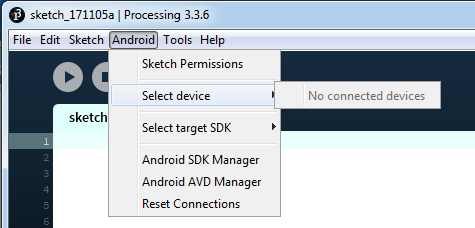
↧
My phone cant be connected
↧
Where is the processing-android.jar?
Hello, I'm follow this guide here: http://android.processing.org/tutorials/android_studio/index.html
But I have a problem, I can't find the processing-andoid.jar. Where is it or where I can download it? o.o And yes, I had google before I asked here. But I don't find a answer for the location of the processing-android.jar. I'm done >.<
↧
↧
Help Me!I use Processing Minim to play Map3 files in Android
Help Me!I use Processing Minim to play Map3 files in Android, but I reported the following error:
11-07 17:12:15.540: I/System.out(28177): ==== JavaSound Minim Error ====
11-07 17:12:15.540: I/System.out(28177): ==== Unable to return a SourceDataLine: unsupported format - PCM_SIGNED 44100.0 Hz, 16 bit, stereo, 4 bytes/frame, little-endian
11-07 17:12:15.540: I/System.out(28177): === Minim Error ===
11-07 17:12:15.540: I/System.out(28177): === Couldn't load the file jingle.mp3
I wrote the code just like this :
minim = new Minim(this);
jingle = minim.loadFile("jingle.mp3", 2048);


↧
android serial usb arduino hiccups?
Hello everyone, i've been working with processing and the android mode for a few days now, and i decided to do this little sensors report when i plug in my android phone to my arduino. i set up the manifest with the vendor IDs and everything and it all works fine but...
even though the arduino Tx lights up continuously (sends data all the time) the processing software looks like it's getting data for a couple of seconds, then looks completely idle for 10 seconds, then takes data again, then no comminucation again... i know the app is not freezing because i'm doing a sliding graph, which happily slides along. any idea what could be causing this hiccup? a buffer overrun?
to be honest i'm trying to make something like a semi-fast DMM, and right now the arduino sends 2 values every 100ms, @38400 baud. is this too fast for the app to handle?
forgive me for the following, but i can't find a code format button...? :D
this is the arduino code:
` void setup() { Serial.begin(38400); pinMode(A0,INPUT); pinMode(A1,INPUT); }
void loop() { Serial.print(analogRead(A0)); Serial.print(";"); Serial.println(analogRead(A1)); delay(150); }`
and the android side:
`import io.inventit.processing.android.serial.*; //ANDROID
//SERIAL PORT Serial myPort; //thermostat serial port String inString=""; //input string from serial port
//FONTS PFont dateFont; //date font
//REALTIME DATA float v1 = 0.0; //voltage1 float v2 = 0.0; //voltage2
//COLORS color activeText = color(182, 230, 244); color inactiveText = color(60, 60, 60);
//BUTTONS transButton resetBtn = new transButton( width/2, height-50, 200, 50, "Reset");
void setup() { fullScreen(); orientation(LANDSCAPE); frameRate(200);
//init fonts dateFont = createFont("WalkwayBold.ttf", 60);
//init USB serial port myPort = new Serial(this, Serial.list(this)[0], 38400); //ANDROID myPort.bufferUntil(10); }
//===========INCOMING DATA FROM THERMOSTAT============= void serialEvent(Serial myPort) { try { inString = myPort.readString(); String[] list = split(inString, ';'); v1 = float(list[0])/1024.0; v2 = float(list[1])/1024.0; } catch(RuntimeException e) { e.printStackTrace(); } }
//===============MAIN LOOP=================== void draw() { //timeNow = millis(); drawMainScreen(); }
//===============DRAWING LOOP=================== void drawMainScreen() { background(36,93,142);
//voltage 1 fill(255); textFont(dateFont); textAlign(LEFT, CENTER); text("v1: " + v1 + "V", 50, 20);
//voltage 2 fill(255); textFont(dateFont); textAlign(LEFT, CENTER); text("v2: " + v2 + "V", 50, 80);
//raw serial input fill(255); textFont(dateFont); textAlign(CENTER, TOP); text("raw: " + inString, 700, 20); `
↧
Inherit frame rate from display
So I've optimized my sketch so every thing runs on the same speed independent from the frame rate so now someone with 30 fps can play at the same speed as someone with 90 fps but it looks smoother for the 90 fps user
But I wondered, the default refresh rate is 60, but I want people with a higher refresh rate to be able to use the app their frame rate limit. (I know its quite rare to find a phone with a 60+ fresh rate but they are out there), so how would I go about that, if I just set the frame rate to 240 and then run it on a 30 fps screen it will just waste computing power trying to get the fps higher than i can actually display it right?
In short, how do I detect the frame-rate of a device and then run processing at that frame rate
↧
↧
loadJSONArray immediately failing on Android build
Hi all! I am working on a little project which makes a request for a JSON array from an external server based on a lat/long pairing. The app compiles ok without errors, and runs ok on the device, but when I tap to make the request it immediately crashes.
I made a change to push the lat/long to the screen and that is functioning ok, and I am casting the lat/long to strings to construct the URL ok, but I am now just a bit stuck why it should just fall over when just trying to push the loadJSONArray request to a JSONArray var.
Any thoughts?
↧
Connecting VR and Ketai Bluetooth in Android mode
Hi all,
I am having problems connecting VR mode and Ketai Bluetooth connectivity in Android mode. (Win10; Porcessing 3.3.5; Android 6.0.1; Samsung S5 Neo). Independently code for Ketai bluetooth works:
import processing.vr.*;
import android.content.Intent;
import android.os.Bundle;
import ketai.net.bluetooth.*;
import ketai.ui.*;
//import ketai.net.*;

PFont fontMy;
KetaiBluetooth bt;
String info = "";

//********************************************************************
// The following code is required to enable bluetooth at startup.
//********************************************************************

void onCreate(Bundle savedInstanceState) {
 super.onCreate(savedInstanceState);
 bt = new KetaiBluetooth(this);
 println("Creating KetaiBluetooth");
}

void onActivityResult(int requestCode, int resultCode, Intent data) {
 bt.onActivityResult(requestCode, resultCode, data);
}

//********************************************************************

void setup() {
  //fullScreen(STEREO);
  size(displayWidth, displayHeight, P3D);
  //start listening for BT connections and connect to a device.
  bt.start();
  bt.connectDevice("00:14:03:06:37:0E");
  //font size
  fontMy = createFont("SansSerif", 40);
  textFont(fontMy);
}

void calculate() {
}

void draw() {
  background(150);
  translate(width/2, height/2);
  noStroke();
  // Green box, Y axis
  pushMatrix();
  translate(0, 200, 0);
  fill(0, 255, 0);
  box(100);
  popMatrix();
  // text from Bluetooth
 // info = "abc\ndef"; //debugging
  text(info, 20, 104);
}

void onBluetoothDataEvent(String who, byte[] data) {
  //received
  info = new String(data);
}
Everything connects nicely to my HC-05 and gets the info, and prints it next to the green box.
But then I decide to add VR functionality, and everything goes wrong. So I un-comment
//fullScreen(STEREO);
and comment
size(displayWidth, displayHeight, P3D);, and change Android mode from "App" to "VR". The build is successful, but the app crashes and I get the following error:
java.lang.NullPointerException: Attempt to invoke virtual method 'boolean ketai.net.bluetooth.KetaiBluetooth.start()' on a null object reference at processing.test.test2.test2.setup(test2.java:63) at processing.core.PApplet.handleDraw(Unknown Source) at processing.vr.PSurfaceVR$AndroidVRStereoRenderer.onDrawEye(Unknown Source) at com.google.vr.sdk.base.CardboardViewNativeImpl.nativeOnDrawFrame(Native Method) at com.google.vr.sdk.base.CardboardViewNativeImpl.access$2500(CardboardViewNativeImpl.java:53) at com.google.vr.sdk.base.CardboardViewNativeImpl$RendererHelper.onDrawFrame(CardboardViewNativeImpl.java:569) at com.google.vr.ndk.base.GvrSurfaceView$GLThread.guardedRun(GvrSurfaceView.java:1643) at com.google.vr.ndk.base.GvrSurfaceView$GLThread.run(GvrSurfaceView.java:1324) handleDraw() called before finishing
The VR-code will work nicely, if I comment the bt.start();and bt.connectDevice("00:14:03:06:37:0E");
Is it normal? Can Ketai work with In-built Processing Arduino VR Mode at all?
Thanks!
↧
Error on app start
I have a game I made and I decided to try to make it for android. I copied the code to another file to start the android version. I changed "mouseX" and "mouseY" to touches[0] for now and I made the keyboard detection section of the code a comment to make sure it didn't stuff up the compiling because it hasn't been opening. The error is below:
FATAL EXCEPTION: Animation Thread
Process: processing.test.trimatelegacyc, PID: 19161
java.lang.UnsatisfiedLinkError: dalvik.system.PathClassLoader[DexPathList[[zip file "/data/app/processing.test.trimatelegacyc-1/base.apk"],nativeLibraryDirectories=[/data/app/processing.test.trimatelegacyc-1/lib/arm, /system/lib, /vendor/lib]]] couldn't find "libMethClaInterface.so"
    at java.lang.Runtime.loadLibrary0(Runtime.java:984)
    at java.lang.System.loadLibrary(System.java:1562)
    at processing.sound.MethClaInterface.<clinit>(Unknown Source)
    at processing.sound.Engine.<init>(Unknown Source)
    at processing.sound.Engine.<init>(Unknown Source)
    at processing.sound.Engine$LazyHolder.<clinit>(Unknown Source)
    at processing.sound.Engine$LazyHolder.access$100(Unknown Source)
    at processing.sound.Engine.start(Unknown Source)
    at processing.sound.SoundFile.<init>(Unknown Source)
    at processing.test.trimatelegacyc.TrimateLegacyC.setup(TrimateLegacyC.java:123)
    at processing.core.PApplet.handleDraw(Unknown Source)
    at processing.core.PSurfaceNone.callDraw(Unknown Source)
    at processing.core.PSurfaceNone$AnimationThread.run(Unknown Source)
FATAL EXCEPTION: Animation Thread
Process: processing.test.trimatelegacyc, PID: 19274
java.lang.UnsatisfiedLinkError: dalvik.system.PathClassLoader[DexPathList[[zip file "/data/app/processing.test.trimatelegacyc-1/base.apk"],nativeLibraryDirectories=[/data/app/processing.test.trimatelegacyc-1/lib/arm, /system/lib, /vendor/lib]]] couldn't find "libMethClaInterface.so"
    at java.lang.Runtime.loadLibrary0(Runtime.java:984)
    at java.lang.System.loadLibrary(System.java:1562)
    at processing.sound.MethClaInterface.<clinit>(Unknown Source)
    at processing.sound.Engine.<init>(Unknown Source)
    at processing.sound.Engine.<init>(Unknown Source)
    at processing.sound.Engine$LazyHolder.<clinit>(Unknown Source)
    at processing.sound.Engine$LazyHolder.access$100(Unknown Source)
    at processing.sound.Engine.start(Unknown Source)
    at processing.sound.SoundFile.<init>(Unknown Source)
    at processing.test.trimatelegacyc.TrimateLegacyC.setup(TrimateLegacyC.java:123)
    at processing.core.PApplet.handleDraw(Unknown Source)
    at processing.core.PSurfaceNone.callDraw(Unknown Source)
    at processing.core.PSurfaceNone$AnimationThread.run(Unknown Source)
The app goes on the phone and then when i open it, it closes back up straight away and doesn't say anything.. Just straight up closes.
Anyone who might know what is going on or needs any more information to help is greatly appreciated :)
↧
Bluetooth / Android
I am following the following tutorial(http://arduinobasics.blogspot.in/2013/03/bluetooth-android-processing-1.html)
I am having problem at this point of the code:
if (!bluetooth.isEnabled()) {
    Intent requestBluetooth = new Intent(BluetoothAdapter.ACTION_REQUEST_ENABLE);
    startActivityForResult(requestBluetooth, 0);
}
It says "The function "startActivityForResult(Intent,int)" does not exist"
↧
↧
Attempt to write to null array
I am testing my game that I made for android and it keeps giving me the error below:
FATAL EXCEPTION: GLThread 263
Process: processing.test.trimatelegacy, PID: 4879
java.lang.NullPointerException: Attempt to write to null array
    at processing.test.trimatelegacy.TrimateLegacy.setup(TrimateLegacy.java:108)
    at processing.core.PApplet.handleDraw(Unknown Source:74)
    at processing.opengl.PSurfaceGLES$RendererGLES.onDrawFrame(Unknown Source:13)
    at android.opengl.GLSurfaceView$GLThread.guardedRun(GLSurfaceView.java:1571)
    at android.opengl.GLSurfaceView$GLThread.run(GLSurfaceView.java:1270)
I have the code below:
https://github.com/rockyhawk64/Trimate/blob/master/Trimate Legacy Code
Does anyone know what may be triggering that or if there was some sort of typo? I am new to the Android side of processing as I usually use the regular java version. Anything will be appreciated!
↧
Launcher Icons for application
I am trying to upload a couple of apps to the Google Play Store but I don't understand exactly how to create my app's icons. This is stated in Processing's Android App Distribution Tutorial: "Android mode uses a set of default launcher icons for the app. You should use your own icons for release by creating the files icon-36, 48, 72, 96, 144, and 192 in .PNG format, and placing them in the sketch's folder before exporting the signed package. Follow the icon design guidelines from Google in order to create your icons."
36, 48, 72, 96 and 144 what? What is this size?
Also, where do I put them in the sketch folder? In the DATA folder?
Thanks in advance!
↧
Sketches were running fine, didn't change anything and now I get an error?!
So I had some Android sketches laying around which worked perfectly the last time I played them on my devices. Today I tried to play them again, and I keep getting this error! Just one time, the app actually played, but it wasn't different than all of my other attempts, it just worked 1 time! This is the error:
FAILURE: Build failed with an exception.
What went wrong: Execution failed for task ':app:mergeDebugResources'.
Error: java.io.FileNotFoundException: C:\Users\User\AppData\Local\Temp\android2968292313261529121sketch\app\build\intermediates\res\merged\debug\drawable-xhdpi-v4\abc_ic_star_black_48dp.png (The process cannot access the file because it is being used by another process)
Try: Run with --stacktrace option to get the stack trace. Run with --info or --debug option to get more log output.
BUILD FAILED in 2s 21 actionable tasks: 21 executed org.gradle.tooling.BuildException: Could not execute build using Gradle distribution 'https://services.gradle.org/distributions/gradle-4.0-bin.zip'. at org.gradle.tooling.internal.consumer.ExceptionTransformer.transform(ExceptionTransformer.java:51) at org.gradle.tooling.internal.consumer.ExceptionTransformer.transform(ExceptionTransformer.java:29) at org.gradle.tooling.internal.consumer.ResultHandlerAdapter.onFailure(ResultHandlerAdapter.java:41) at org.gradle.tooling.internal.consumer.async.DefaultAsyncConsumerActionExecutor$1$1.run(DefaultAsyncConsumerActionExecutor.java:57) at org.gradle.internal.concurrent.ExecutorPolicy$CatchAndRecordFailures.onExecute(ExecutorPolicy.java:63) at org.gradle.internal.concurrent.StoppableExecutorImpl$1.run(StoppableExecutorImpl.java:46) at java.util.concurrent.ThreadPoolExecutor.runWorker(ThreadPoolExecutor.java:1149) at java.util.concurrent.ThreadPoolExecutor$Worker.run(ThreadPoolExecutor.java:624) at org.gradle.internal.concurrent.ThreadFactoryImpl$ManagedThreadRunnable.run(ThreadFactoryImpl.java:55) at java.lang.Thread.run(Thread.java:748) at org.gradle.tooling.internal.consumer.BlockingResultHandler.getResult(BlockingResultHandler.java:46) at org.gradle.tooling.internal.consumer.DefaultBuildLauncher.run(DefaultBuildLauncher.java:77) at processing.mode.android.AndroidBuild.gradleBuild(AndroidBuild.java:265) at processing.mode.android.AndroidBuild.build(AndroidBuild.java:201) at processing.mode.android.AndroidMode.handleRunEmulator(AndroidMode.java:277) at processing.mode.android.AndroidEditor$14.run(AndroidEditor.java:351) Caused by: org.gradle.internal.exceptions.LocationAwareException: Execution failed for task ':app:mergeDebugResources'. at org.gradle.initialization.DefaultExceptionAnalyser.transform(DefaultExceptionAnalyser.java:74) at org.gradle.initialization.MultipleBuildFailuresExceptionAnalyser.transform(MultipleBuildFailuresExceptionAnalyser.java:47) at org.gradle.initialization.StackTraceSanitizingExceptionAnalyser.transform(StackTraceSanitizingExceptionAnalyser.java:30) at org.gradle.initialization.DefaultGradleLauncher$1.run(DefaultGradleLauncher.java:124) at org.gradle.internal.work.DefaultWorkerLeaseService$2.execute(DefaultWorkerLeaseService.java:124) at org.gradle.initialization.DefaultGradleLauncher.doBuild(DefaultGradleLauncher.java:116) at org.gradle.initialization.DefaultGradleLauncher.run(DefaultGradleLauncher.java:99) at org.gradle.launcher.exec.GradleBuildController.run(GradleBuildController.java:66) at org.gradle.tooling.internal.provider.runner.BuildModelActionRunner.run(BuildModelActionRunner.java:50) at org.gradle.launcher.exec.ChainingBuildActionRunner.run(ChainingBuildActionRunner.java:35) at org.gradle.launcher.exec.ChainingBuildActionRunner.run(ChainingBuildActionRunner.java:35) at org.gradle.tooling.internal.provider.ValidatingBuildActionRunner.run(ValidatingBuildActionRunner.java:32) at org.gradle.launcher.exec.RunAsBuildOperationBuildActionRunner$1.run(RunAsBuildOperationBuildActionRunner.java:43) at org.gradle.internal.progress.DefaultBuildOperationExecutor$RunnableBuildOperationWorker.execute(DefaultBuildOperationExecutor.java:317) at org.gradle.internal.progress.DefaultBuildOperationExecutor$RunnableBuildOperationWorker.execute(DefaultBuildOperationExecutor.java:309) at org.gradle.internal.progress.DefaultBuildOperationExecutor.execute(DefaultBuildOperationExecutor.java:185) at org.gradle.internal.progress.DefaultBuildOperationExecutor.run(DefaultBuildOperationExecutor.java:95) at org.gradle.launcher.exec.RunAsBuildOperationBuildActionRunner.run(RunAsBuildOperationBuildActionRunner.java:40) at org.gradle.tooling.internal.provider.SubscribableBuildActionRunner.run(SubscribableBuildActionRunner.java:51) at org.gradle.launcher.exec.InProcessBuildActionExecuter.execute(InProcessBuildActionExecuter.java:44) at org.gradle.launcher.exec.InProcessBuildActionExecuter.execute(InProcessBuildActionExecuter.java:28) at org.gradle.tooling.internal.provider.ContinuousBuildActionExecuter.execute(ContinuousBuildActionExecuter.java:75) at org.gradle.tooling.internal.provider.ContinuousBuildActionExecuter.execute(ContinuousBuildActionExecuter.java:49) at org.gradle.tooling.internal.provider.ServicesSetupBuildActionExecuter.execute(ServicesSetupBuildActionExecuter.java:51) at org.gradle.tooling.internal.provider.ServicesSetupBuildActionExecuter.execute(ServicesSetupBuildActionExecuter.java:32) at org.gradle.tooling.internal.provider.GradleThreadBuildActionExecuter.execute(GradleThreadBuildActionExecuter.java:36) at org.gradle.tooling.internal.provider.GradleThreadBuildActionExecuter.execute(GradleThreadBuildActionExecuter.java:25) at org.gradle.tooling.internal.provider.StartParamsValidatingActionExecuter.execute(StartParamsValidatingActionExecuter.java:64) at org.gradle.tooling.internal.provider.StartParamsValidatingActionExecuter.execute(StartParamsValidatingActionExecuter.java:29) at org.gradle.tooling.internal.provider.SessionFailureReportingActionExecuter.execute(SessionFailureReportingActionExecuter.java:55) at org.gradle.tooling.internal.provider.SessionFailureReportingActionExecuter.execute(SessionFailureReportingActionExecuter.java:42) at org.gradle.tooling.internal.provider.SetupLoggingActionExecuter.execute(SetupLoggingActionExecuter.java:50) at org.gradle.tooling.internal.provider.SetupLoggingActionExecuter.execute(SetupLoggingActionExecuter.java:30) at org.gradle.launcher.daemon.server.exec.ExecuteBuild.doBuild(ExecuteBuild.java:67) at org.gradle.launcher.daemon.server.exec.BuildCommandOnly.execute(BuildCommandOnly.java:36) at org.gradle.launcher.daemon.server.api.DaemonCommandExecution.proceed(DaemonCommandExecution.java:120) at org.gradle.launcher.daemon.server.exec.WatchForDisconnection.execute(WatchForDisconnection.java:37) at org.gradle.launcher.daemon.server.api.DaemonCommandExecution.proceed(DaemonCommandExecution.java:120) at org.gradle.launcher.daemon.server.exec.ResetDeprecationLogger.execute(ResetDeprecationLogger.java:26) at org.gradle.launcher.daemon.server.api.DaemonCommandExecution.proceed(DaemonCommandExecution.java:120) at org.gradle.launcher.daemon.server.exec.RequestStopIfSingleUsedDaemon.execute(RequestStopIfSingleUsedDaemon.java:34) at org.gradle.launcher.daemon.server.api.DaemonCommandExecution.proceed(DaemonCommandExecution.java:120) at org.gradle.launcher.daemon.server.exec.ForwardClientInput$2.call(ForwardClientInput.java:74) at org.gradle.launcher.daemon.server.exec.ForwardClientInput$2.call(ForwardClientInput.java:72) at org.gradle.util.Swapper.swap(Swapper.java:38) at org.gradle.launcher.daemon.server.exec.ForwardClientInput.execute(ForwardClientInput.java:72) at org.gradle.launcher.daemon.server.api.DaemonCommandExecution.proceed(DaemonCommandExecution.java:120) at org.gradle.launcher.daemon.server.exec.LogAndCheckHealth.execute(LogAndCheckHealth.java:55) at org.gradle.launcher.daemon.server.api.DaemonCommandExecution.proceed(DaemonCommandExecution.java:120) at org.gradle.launcher.daemon.server.exec.LogToClient.doBuild(LogToClient.java:62) at org.gradle.launcher.daemon.server.exec.BuildCommandOnly.execute(BuildCommandOnly.java:36) at org.gradle.launcher.daemon.server.api.DaemonCommandExecution.proceed(DaemonCommandExecution.java:120) at org.gradle.launcher.daemon.server.exec.EstablishBuildEnvironment.doBuild(EstablishBuildEnvironment.java:72) at org.gradle.launcher.daemon.server.exec.BuildCommandOnly.execute(BuildCommandOnly.java:36) at org.gradle.launcher.daemon.server.api.DaemonCommandExecution.proceed(DaemonCommandExecution.java:120) at org.gradle.launcher.daemon.server.exec.StartBuildOrRespondWithBusy$1.run(StartBuildOrRespondWithBusy.java:50) at org.gradle.launcher.daemon.server.DaemonStateCoordinator$1.run(DaemonStateCoordinator.java:297) at org.gradle.internal.concurrent.ExecutorPolicy$CatchAndRecordFailures.onExecute(ExecutorPolicy.java:63) at org.gradle.internal.concurrent.StoppableExecutorImpl$1.run(StoppableExecutorImpl.java:46) at org.gradle.internal.concurrent.ThreadFactoryImpl$ManagedThreadRunnable.run(ThreadFactoryImpl.java:55) Caused by: org.gradle.api.tasks.TaskExecutionException: Execution failed for task ':app:mergeDebugResources'. at org.gradle.api.internal.tasks.execution.ExecuteActionsTaskExecuter.executeActions(ExecuteActionsTaskExecuter.java:100) at org.gradle.api.internal.tasks.execution.ExecuteActionsTaskExecuter.execute(ExecuteActionsTaskExecuter.java:70) at org.gradle.api.internal.tasks.execution.SkipUpToDateTaskExecuter.execute(SkipUpToDateTaskExecuter.java:64) at org.gradle.api.internal.tasks.execution.ResolveTaskOutputCachingStateExecuter.execute(ResolveTaskOutputCachingStateExecuter.java:54) at org.gradle.api.internal.tasks.execution.ValidatingTaskExecuter.execute(ValidatingTaskExecuter.java:58) at org.gradle.api.internal.tasks.execution.SkipEmptySourceFilesTaskExecuter.execute(SkipEmptySourceFilesTaskExecuter.java:88) at org.gradle.api.internal.tasks.execution.ResolveTaskArtifactStateTaskExecuter.execute(ResolveTaskArtifactStateTaskExecuter.java:52) at org.gradle.api.internal.tasks.execution.SkipTaskWithNoActionsExecuter.execute(SkipTaskWithNoActionsExecuter.java:52) at org.gradle.api.internal.tasks.execution.SkipOnlyIfTaskExecuter.execute(SkipOnlyIfTaskExecuter.java:54) at org.gradle.api.internal.tasks.execution.ExecuteAtMostOnceTaskExecuter.execute(ExecuteAtMostOnceTaskExecuter.java:43) at org.gradle.api.internal.tasks.execution.CatchExceptionTaskExecuter.execute(CatchExceptionTaskExecuter.java:34) at org.gradle.execution.taskgraph.DefaultTaskGraphExecuter$EventFiringTaskWorker$1.run(DefaultTaskGraphExecuter.java:242) at org.gradle.internal.progress.DefaultBuildOperationExecutor$RunnableBuildOperationWorker.execute(DefaultBuildOperationExecutor.java:317) at org.gradle.internal.progress.DefaultBuildOperationExecutor$RunnableBuildOperationWorker.execute(DefaultBuildOperationExecutor.java:309) at org.gradle.internal.progress.DefaultBuildOperationExecutor.execute(DefaultBuildOperationExecutor.java:185) at org.gradle.internal.progress.DefaultBuildOperationExecutor.run(DefaultBuildOperationExecutor.java:95) at org.gradle.execution.taskgraph.DefaultTaskGraphExecuter$EventFiringTaskWorker.execute(DefaultTaskGraphExecuter.java:235) at org.gradle.execution.taskgraph.DefaultTaskGraphExecuter$EventFiringTaskWorker.execute(DefaultTaskGraphExecuter.java:224) at org.gradle.execution.taskgraph.DefaultTaskPlanExecutor$TaskExecutorWorker.processTask(DefaultTaskPlanExecutor.java:121) at org.gradle.execution.taskgraph.DefaultTaskPlanExecutor$TaskExecutorWorker.access$200(DefaultTaskPlanExecutor.java:77) at org.gradle.execution.taskgraph.DefaultTaskPlanExecutor$TaskExecutorWorker$1.execute(DefaultTaskPlanExecutor.java:102) at org.gradle.execution.taskgraph.DefaultTaskPlanExecutor$TaskExecutorWorker$1.execute(DefaultTaskPlanExecutor.java:96) at org.gradle.execution.taskgraph.DefaultTaskExecutionPlan.execute(DefaultTaskExecutionPlan.java:612) at org.gradle.execution.taskgraph.DefaultTaskExecutionPlan.executeWithTask(DefaultTaskExecutionPlan.java:567) at org.gradle.execution.taskgraph.DefaultTaskPlanExecutor$TaskExecutorWorker.run(DefaultTaskPlanExecutor.java:96) at org.gradle.execution.taskgraph.DefaultTaskPlanExecutor.process(DefaultTaskPlanExecutor.java:57) at org.gradle.execution.taskgraph.DefaultTaskGraphExecuter.execute(DefaultTaskGraphExecuter.java:122) at org.gradle.execution.SelectedTaskExecutionAction.execute(SelectedTaskExecutionAction.java:37) at org.gradle.execution.DefaultBuildExecuter.execute(DefaultBuildExecuter.java:37) at org.gradle.execution.DefaultBuildExecuter.access$000(DefaultBuildExecuter.java:23) at org.gradle.execution.DefaultBuildExecuter$1.proceed(DefaultBuildExecuter.java:43) at org.gradle.execution.DryRunBuildExecutionAction.execute(DryRunBuildExecutionAction.java:46) at org.gradle.execution.DefaultBuildExecuter.execute(DefaultBuildExecuter.java:37) at org.gradle.execution.DefaultBuildExecuter.execute(DefaultBuildExecuter.java:30) at org.gradle.initialization.DefaultGradleLauncher$ExecuteTasks.run(DefaultGradleLauncher.java:253) at org.gradle.internal.progress.DefaultBuildOperationExecutor$RunnableBuildOperationWorker.execute(DefaultBuildOperationExecutor.java:317) at org.gradle.internal.progress.DefaultBuildOperationExecutor$RunnableBuildOperationWorker.execute(DefaultBuildOperationExecutor.java:309) at org.gradle.internal.progress.DefaultBuildOperationExecutor.execute(DefaultBuildOperationExecutor.java:185) at org.gradle.internal.progress.DefaultBuildOperationExecutor.run(DefaultBuildOperationExecutor.java:95) at org.gradle.initialization.DefaultGradleLauncher.doBuildStages(DefaultGradleLauncher.java:170) at org.gradle.initialization.DefaultGradleLauncher.access$200(DefaultGradleLauncher.java:44) at org.gradle.initialization.DefaultGradleLauncher$1.run(DefaultGradleLauncher.java:122) ... 56 more Caused by: com.android.build.gradle.tasks.ResourceException: Error: java.io.FileNotFoundException: C:\Users\User\AppData\Local\Temp\android2968292313261529121sketch\app\build\intermediates\res\merged\debug\drawable-xhdpi-v4\abc_ic_star_black_48dp.png (The process cannot access the file because it is being used by another process) at com.android.build.gradle.tasks.MergeResources.doFullTaskAction(MergeResources.java:166) at com.android.build.gradle.internal.tasks.IncrementalTask.taskAction(IncrementalTask.java:88) at org.gradle.internal.reflect.JavaMethod.invoke(JavaMethod.java:73) at org.gradle.api.internal.project.taskfactory.DefaultTaskClassInfoStore$IncrementalTaskAction.doExecute(DefaultTaskClassInfoStore.java:168) at org.gradle.api.internal.project.taskfactory.DefaultTaskClassInfoStore$StandardTaskAction.execute(DefaultTaskClassInfoStore.java:134) at org.gradle.api.internal.project.taskfactory.DefaultTaskClassInfoStore$StandardTaskAction.execute(DefaultTaskClassInfoStore.java:121) at org.gradle.api.internal.tasks.execution.ExecuteActionsTaskExecuter$1.run(ExecuteActionsTaskExecuter.java:122) at org.gradle.internal.progress.DefaultBuildOperationExecutor$RunnableBuildOperationWorker.execute(DefaultBuildOperationExecutor.java:317) at org.gradle.internal.progress.DefaultBuildOperationExecutor$RunnableBuildOperationWorker.execute(DefaultBuildOperationExecutor.java:309) at org.gradle.internal.progress.DefaultBuildOperationExecutor.execute(DefaultBuildOperationExecutor.java:185) at org.gradle.internal.progress.DefaultBuildOperationExecutor.run(DefaultBuildOperationExecutor.java:95) at org.gradle.api.internal.tasks.execution.ExecuteActionsTaskExecuter.executeAction(ExecuteActionsTaskExecuter.java:111) at org.gradle.api.internal.tasks.execution.ExecuteActionsTaskExecuter.executeActions(ExecuteActionsTaskExecuter.java:92) ... 97 more Caused by: Error: java.io.FileNotFoundException: C:\Users\User\AppData\Local\Temp\android2968292313261529121sketch\app\build\intermediates\res\merged\debug\drawable-xhdpi-v4\abc_ic_star_black_48dp.png (The process cannot access the file because it is being used by another process) at com.android.ide.common.res2.MergedResourceWriter.end(MergedResourceWriter.java:283) at com.android.ide.common.res2.DataMerger.mergeData(DataMerger.java:301) at com.android.ide.common.res2.ResourceMerger.mergeData(ResourceMerger.java:410) at com.android.build.gradle.tasks.MergeResources.doFullTaskAction(MergeResources.java:159) ... 109 more Caused by: java.util.concurrent.ExecutionException: java.io.FileNotFoundException: C:\Users\User\AppData\Local\Temp\android2968292313261529121sketch\app\build\intermediates\res\merged\debug\drawable-xhdpi-v4\abc_ic_star_black_48dp.png (The process cannot access the file because it is being used by another process) at com.google.common.util.concurrent.AbstractFuture$Sync.getValue(AbstractFuture.java:299) at com.google.common.util.concurrent.AbstractFuture$Sync.get(AbstractFuture.java:286) at com.google.common.util.concurrent.AbstractFuture.get(AbstractFuture.java:116) at com.android.ide.common.res2.MergedResourceWriter.end(MergedResourceWriter.java:279) ... 112 more Caused by: java.io.FileNotFoundException: C:\Users\User\AppData\Local\Temp\android2968292313261529121sketch\app\build\intermediates\res\merged\debug\drawable-xhdpi-v4\abc_ic_star_black_48dp.png (The process cannot access the file because it is being used by another process) at com.google.common.io.Files$FileByteSink.openStream(Files.java:200) at com.google.common.io.Files$FileByteSink.openStream(Files.java:188) at com.google.common.io.ByteSource.copyTo(ByteSource.java:240) at com.google.common.io.Files.copy(Files.java:305) at com.android.builder.internal.aapt.v1.AaptV1.lambda$compile$0(AaptV1.java:455) The APK file is missing Shutting down any existing adb server... Done.
Please help. Thanks!
↧
How can I play an android project on my android device ?
The question must sound odd but there is something I don't get right... I installed the SDK, set up my device's settings, and I can launch my work directly on it, within the USB. But how can I create an app ? I tried "Export android package", it exports quite lot of files, but when I put them on my device, there is no file understood as a lauhcheable one. I don't get it !
↧
↧
The type oscP5.OscMessage cannot be resolved...
I am running the example "BluetoothCursors" from Ketai library.
there is an error at line 125 \n
if (m.checkAddrPattern("/remoteMouse/"))
the error is as follows - \n
"The type oscP5.OscMessage cannot be resolved. It is indirectly referenced from required .class files"
Can anyone shed some light on how to solve the issue.
If possible please suggest how to understand more clearly the ketai bluetooth cold.
↧
No device connected!?
I have connected my huawei honor 7 lite to my laptop, but it says: "No device connected" I have enabled usb debugging. Help!
↧
How to make a ping?
Please, could someone give me an example of android code to make a ping to a IP address and get the result?
↧
Apde + ketai
Hello everyone, I was trying to use APDE plus the ketai library, just any example in the library I'm throwing an error. the error changes based on the path of the library you are looking for, in this example:
Initializing build sequence... Deleted old build folder Injected log broadcaster No library found for ketai.cv.facedetector Detected architecture arm64-v8a
Packaging resources with AAPT... [/data/user/0/com.calsignlabs.apde/files/tmp/aapt, package, -v, -f, -m, -S, /data/user/0/com.calsignlabs.apde/app_build/res/, -J, /data/user/0/com.calsignlabs.apde/app_build/gen, -A, /data/user/0/com.calsignlabs.apde/app_build/assets, -M, /data/user/0/com.calsignlabs.apde/app_build/AndroidManifest.xml, -I, /data/user/0/com.calsignlabs.apde/files/tmp/android.jar, -F, /data/user/0/com.calsignlabs.apde/app_build/bin/FaceDetector.apk.res] null null Calling by::className:com.calsignlabs.apde.build.Build MethodName:build AAPT exited with error code 1
I do not understand how it is possible, yet the library seems to be installed correctly. Thank you to all.
↧
↧
How to use different SDK
Since I moved onto the new Android Mode version, 4.0, whenever I change the target SDK or minimum SDK, save and click "run", the target SDK gets reset to 26 which is 10 SDKs too new for my dev phone. This results in "INSTALL_FAILED_OLDER_SDK" instead of a working app. How do I change the SDK that Processing compiles with? I used to be able to change it through the menu but it seems to have been removed, along with the graphical SDK manager. It seems features have been removed, not added, this time around. If possible, can I go back to a previous version of the Android Mode? The old versions were much easier to use and had more features, like being able to change the SDK and install different SDK versions with a graphical manager.
↧
How to use Magnetic Field Sensor?
I can't figure out how to use the Magnetic field sensor, I may be completely dumb but take a look at this:
import android.content.Context;
import android.hardware.Sensor;
import android.hardware.SensorManager;
import android.hardware.SensorEvent;
import android.hardware.SensorEventListener;

Context context;
SensorManager manager;
Sensor sensor;
float X1;
float Y1;
float Z1;

void setup() {
  fullScreen();

  context = getActivity();
  manager = (SensorManager)context.getSystemService(Context.SENSOR_SERVICE);
  sensor = manager.getDefaultSensor(Sensor.TYPE_ACCELEROMETER);

 // manager.registerListener(listener, sensor, SensorManager.SENSOR_DELAY_GAME);
}
public void onSensorChanged(SensorEvent event)
     {
       X1 = event.values[0];
       Y1 = event.values[1];
       Z1 = event.values[2];
     }

void draw() {


  text(str(X1) + " " + str(Y1) + " " + str(Z1) , width/2, height/2);
}
All I get is 0.0, 0.0, 0.0 (And my phone does have the sensor) Does anyone know the proper way of doing this?
↧
Receive OSC using OscP5 library, Android Mode 4.0-beta2
Hey, how is it going?
Im trying to receive osc on my mobile, using OscP5 library and android mode 4.0-beta2. Codes:
Android app
import oscP5.*;
import netP5.*;

OscP5 oscP5;
NetAddress endereco;

float x = 1.0;
float y = 2.0;
float z = 3.0;

void setup() {
  fullScreen();
  orientation(LANDSCAPE);
  textSize(100);
  oscP5 = new OscP5(this, 9000);
  endereco = new NetAddress("localhost", 10000); // not sure if i even need to import netP5
}

void draw() {
  background(0);
  fill(255);
  text("x = " + x, 20, 200);
  text("y = " + y, 20, 400);
  text("z = " + z, 20, 600);
}

void oscEvent(OscMessage mensagem) {
  // tests if any message is being received at all
  fill(255);
  rect(50, 30, 100, 100);

  if (mensagem.checkAddrPattern("/x")) x = mensagem.get(0).floatValue();
  else if (mensagem.checkAddrPattern("/y")) y = mensagem.get(0).floatValue();
  else if (mensagem.checkAddrPattern("/z")) z = mensagem.get(0).floatValue();
}
Java code running on my laptop
import oscP5.*;
import netP5.*;

OscP5 osc;
NetAddress endereco;

float x = 0;
float y = 0;
float z = 0;

OscMessage mx = new OscMessage("/x");
OscMessage my = new OscMessage("/y");
OscMessage mz = new OscMessage("/z");

void setup() {
  osc = new OscP5(this, 12000);
  endereco = new NetAddress("192.168.25.2", 9000);

}

void draw() {
}

void keyPressed() {
  if (key == 'q') {
    x += 10.4;
    mx.add(x);
    osc.send(mx, endereco);
    mx.clearArguments();
  } else if (key == 'w') {
    x -= 10.5;
    mx.add(x);
    osc.send(mx, endereco);
    mx.clearArguments();
  } else if (key == 'a') {
    y += 10.4;
    my.add(y);
    osc.send(my, endereco);
    my.clearArguments();
  } else if (key == 's') {
    y -= 10.5;
    my.add(y);
    osc.send(my, endereco);
    my.clearArguments();
  } else if (key == 'z') {
    z += 10.4;
    mz.add(z);
    osc.send(mz, endereco);
    mz.clearArguments();
  } else if (key == 'x') {
    z -= 10.5;
    mz.add(z);
    osc.send(mz, endereco);
    mz.clearArguments();
  }
}
They are both connected to the same Wifi network, im pretty sure the IP address is correct, but it just does not receive the message sent, the INTERNET permission is checked for the app. What can I be missing?
Using Processing 3.2.1, Android Mode 4.0-beta2, Android 6.0 (API 23), Zenphone 2 Laser Android 5.0.2.
All best Thanks in advance
↧