Quantcast
Channel: Android Mode - Processing 2.x and 3.x Forum
Viewing all 941 articles
Browse latest View live

Odd ZXing Decoder Error

$
0
0

I am currently writing an application for Android that uses the ZXing library to encode/decode QR codes. I have tried all versions of ZXing from 3.3.1 to 1.9 to see if this error would go away, but it has not. There seems to be no questions asked regarding this on these forums or elsewhere online, and nothing in the ZXing documentation seem to reference this, either.

The error in question is "The function "decode()" expects paramaters like: "decode(MonochromeBitmapSource)"" despite both the code I am trying out (https://gist.github.com/darkwave/43352f775e6f767a11cb) and the ZXing documentation for the decoder (https://zxing.github.io/zxing/apidocs/com/google/zxing/Reader.html / https://zxing.github.io/zxing/apidocs/com/google/zxing/MultiFormatReader.html) requiring a BinaryBitmap to function, not a MonochromeBitmapSource like Processing is demanding. Something more bizarre is the fact the documentation doesn't even have a page for MonochromeBitmapSource.

Are there any potential workarounds people have made for this? I'd prefer a solution that doesn't require the Java AWT libraries, which most solutions I have come across for QR code decoding in Android require.


What are the exact steps to add AdMob to my app?

$
0
0

Hello all!

I am new to coding, been only doing it daily for a month or two, and I just finished my first game for android. I would like to add it to the Google Play Store with AdMob. I have registered for AdMob, and now I need to incorporate the ads to my code, however, I have no idea how to do that.

I already saw https://forum.processing.org/two/discussion/16686/how-to-add-admob and I read through all of it twice, but am still completely at a loss. The topic is really messy and riddled with trials and errors, and has code and symbols that I have never used nor understood at all, making its contents practically unreadable for someone with as little coding experience as me. What is a manifest? What's a .jar file, why do I need it and where do I get it?

I put so much effort into my game and I am so eager to see it in the store, but I just can't get past this final step.

If some kind soul could give me and, likely, the thousands of other newcomers looking for an answer, a step-by-step walkthrough of exactly what I need to download, where I need to download it, and provide an organized snippet of code that I can adapt for my program, words can't describe how grateful I would be.

Thank you all in advance!

Keystore

$
0
0

.keystore files .....

How does it work if I already have a keystore file that I want to use to build my apk files? In fact I have several and would like to be able to select whichever I need. I already have these in use for apps on Playstore, so must use them, but Processing always wants to create a new keystore file when I export,

Thanks Mark

Improve alert function

$
0
0

I needed to display alerts in processing android so I got some code from another post and boiled it down to this

import android.app.AlertDialog;

String alertMessage;

void setup() {
  alertMessage = "This is the message";
  createAlert();
}

void createAlert() {
  runOnUiThread(new Runnable() {
    @ Override
      public void run() {
      AlertDialog.Builder alertDialog = new AlertDialog.Builder(getActivity());
      alertDialog.setTitle("Alert");
      alertDialog.setMessage(alertMessage);
      alertDialog.setPositiveButton("OK", null);
      alertDialog.show();
    }
  }
  );
}

Which works great but now to display some text in an alert I have to change the alertMessage and then call the function, there must be a way to turn it into a function that takes in a string, something like this createAlert("This is the message"); but I cant figure out how to do it with the UiThread being inside the function.

Any advice?

Where to store images for loadImage("image.png")?

$
0
0

I'm having trouble loading my images when working in Android Studio. I had the same problem when I was working with plain Java, so I know it just comes down to where I store the files. Based on (possibly outdated) answers to basically the same question, I've tried creating folders named 'data,' 'assets,' and 'files' in various locations in my project, as well as the built-in folder 'build/generated/assets.' Seems like maybe there's a new answer to this?

Here is what appears to be the relevant line from the stacktrace:

W/System.err: java.io.FileNotFoundException: /data/data/com.wordpress.deivescollins.blackcauldron/files/cauldron.png: open failed: ENOENT (No such file or directory)

TL;DR Where do my images go when I'm working with Android Studio?

How to load and save table on android without error "File contains a path separator"?

$
0
0

Hey! I'm trying to develop an app on android with processing that needs to save information in a table for next time use and then retrieve it later on. (Sort of like a leaderboard record). The problem is that saveTable() and loadTable() don't work because the error java.lang.IllegalArgumentException: File contains a path separator is returned. Here is bascially what I'm trying to do (Which works fine on normal PC): In setup:

try { PersonalDetails = loadTable("AccountInfo.csv", "header"); // PersonalDetails is my table variable. if (PersonalDetails.getRowCount() > 0) { Registered = true; LocalScore = PersonalDetails.getRow(0).getInt("Score"); } } catch (NullPointerException e) { Table createCSV = new Table(); createCSV.addColumn("ID", Table.INT); createCSV.addColumn("Score", Table.INT); createCSV.addColumn("Name", Table.STRING); saveTable(createCSV, "data/AccountInfo.csv"); PersonalDetails = loadTable("AccountInfo.csv", "header"); if (PersonalDetails.getRowCount() > 0) { Registered = true; LocalScore = PersonalDetails.getRow(0).getInt("Score"); } }

And then in draw basically continuously save as score updates:

void draw() { if (Start) { if (Registered) { PersonalDetails.setInt(0, "Score", LocalScore); saveTable(PersonalDetails, "data/AccountInfo.csv"); } } background(255); }

As for android I continued to get the error stated above. I've tried multiple solutions to try to fix this including an InputStream and BufferedReader, this read the file perfectly fine:

BufferedReader br; String line; void readInfo() { try { InputStream is = createInput("AccountInfo.txt"); br = new BufferedReader(new InputStreamReader(is, "UTF-8")); while ((line=br.readLine())!=null) { System.out.println(line); } } catch (IOException e) { System.out.println("IOException when trying to read AccountInfo.txt:\n"+e); System.exit(0); } }

But, every approach i've taken so far to try to write the file failed. I'm assuming read works better because it will auto search the /files/ directory when not specified with a path. So far i've tried to use a BufferedWriter and PrintWriter in the same way as readInfo() above, hoping it would work, but it didn't:

PrintWriter saveInformation; BufferedWriter writer = null; void saveInfo() { try { writer = new BufferedWriter(new FileWriter("accountinfo.csv")); saveInformation = new PrintWriter("accountinfo.csv"); saveInformation.println("Changed Text File..."); writer.write("Changed Text file..."); } catch ( IOException e) { } finally { try { if ( writer != null ) writer.close( ); if (saveInformation != null) saveInformation.close(); } catch ( IOException e) { } } }

I have also tried to use the AssetManager, couldn't get that working. Also, I tried to use all above listed methods with relative file path and absolute file path. Each of these would similarly return the same error "java.lang.IllegalArgumentException: File contains a path separator".

Any help or feedback on the matter would be immensely very much greatly incredibly much appreciated!

Request permission for READ_EXTERNAL_STORAGE

$
0
0

I need to READ a .txt from the external storage on my android device, it works but i have to grant the permission accessing to my phone´s settings. What i want is the app I made asks me if I want to grant the permission after o when its beeing instaled. Doing some research I found this code for WRITE in the example "DataCapture" in the ketai library. It works, I get the dialog box asking me for the permission. I´ve been triying to modify this for the READ_EXTERNAL_STORAGE but i failed. I have checked the box in the sketch permissions, still does not work.

     setup {

      requestPermission("android.permission.WRITE_EXTERNAL_STORAGE", "handleRequest");

          }

      void handleRequest(boolean granted) {

        if (granted) {

      db = new KetaiSQLite(this);

     //lets make our table if it is the first time we're running

     if ( db.connect() )

      {

       // for initial app launch there are no tables so we make one

       if (!db.tableExists("data"))

        db.execute(CREATE_DB_SQL);

                       }

                  }

          }

There are a lot of examples for android about this but for processing-android mode only found this one. Hope someone can help me. Thanks

Can't install apk...

$
0
0

Hello, I tried to build my first apk, strictly following what's written here. http://android.processing.org/tutorials/getting_started/index.html I generated the apk but, when I try to install it on the device (LG G4) I got a parsing error. I am running Android 6.0. Target sdk is 26 (min 17). BTW...is there a way to change it? Tried to change the manifest but it's rewritten by the IDE...


Image processing on Android - poor permormance.

$
0
0

Hi there !

I have made simple code which is performing a blue filter. It adds some value to R value and substract something from GB values in two for() loops. It works great on PC but on mobile the performance is really slow. You can see the stuttering on the screen below. Ofc. changing the size of capture image helps but it is not a solution I am looking. How can you improve the performance, what's the best way to do image proccesing on mobile ?

Code:

import ketai.camera.*;

PImage prev;
float threshold = 60;

color currentColor;
color lastColor;

float r1 = 0;
float g1 = 0;
float b1 = 0;

KetaiCamera cam;
void setup() {
  orientation(LANDSCAPE);
  imageMode(CENTER);
  cam = new KetaiCamera(this, 320, 240, 24);
  prev = createImage(320, 240, RGB);
  cam.start();
}

void onCameraPreviewEvent(){
  cam.read();
}

void draw() {
    image(prev, width/2, height/2);
    cam.loadPixels();
    prev.loadPixels();
    loadPixels();

    for (int y = 0; y < cam.height; y++ )
  {
    for (int x = 0; x < cam.width; x++ )
    {
      int loc = x + y * cam.width;
      currentColor = cam.pixels[loc]; //current values, taken from cam
      lastColor = prev.pixels[loc];

      float r1 = red(currentColor);
      float g1 = green(currentColor);
      float b1 = blue(currentColor);

      //pixels[loc] = color(r1+30,g1-35,b1-35);
      //float r2 = red(lastColor);
      //float g2 = green(lastColor);
      //float b2 = blue(lastColor);

       prev.pixels[loc] = color(r1-40,g1-40,b1+40);
      //prev.pixels[loc] = lerpColor(lastColor, currentColor, 0.9);

    }
  }
    prev.updatePixels();
    //image(prev, width/2, height/2);
    updatePixels();
  }

filtr

Android ketai Bluetooth read

$
0
0

Hi! I'm using the following code to communicate with arduino on Android, it works great, but can't figure out, how to read the stream until specified character received. Thanks in advance!


import android.content.Intent;

import android.os.Bundle;

import ketai.net.bluetooth.*;

import ketai.ui.*;

import ketai.net.*;


PFont fontMy;

boolean bReleased = true; //no permament sending when finger is tap

KetaiBluetooth bt;

boolean isConfiguring = true;

String info = "";
String asd = "";
KetaiList klist;

ArrayList devicesDiscovered = new ArrayList();


//********************************************************************

// The following code is required to enable bluetooth at startup.

//********************************************************************


void onCreate(Bundle savedInstanceState) {

 super.onCreate(savedInstanceState);

 bt = new KetaiBluetooth(this);

}


void onActivityResult(int requestCode, int resultCode, Intent data) {

 bt.onActivityResult(requestCode, resultCode, data);

}


void setup() {

 size(displayWidth, displayHeight);

 frameRate(10);

 orientation(PORTRAIT);

 background(0);


 //start listening for BT connections

 bt.start();

 //at app start select device…

 isConfiguring = true;

 //font size

 fontMy = createFont("SansSerif", 40);

 textFont(fontMy);

}


void draw() {

 //at app start select device

 if (isConfiguring)

 {

  ArrayList names;

  background(78, 93, 75);

  klist = new KetaiList(this, bt.getPairedDeviceNames());

  isConfiguring = false;

 }

 else

 {

  background(0,50,0);

  if((mousePressed) && (bReleased == true))

  {

 //send with BT

  byte[] data = {'s','w','i','t','c','h','\r'};

  bt.broadcast(data);

 //first tap off to send z next message

  bReleased = false;

  }

  if(mousePressed == false)

  {

  bReleased = true; //finger is up

  }

 //print received data

  fill(255);

  noStroke();

  textAlign(LEFT);

  text( info , 20, 104);

 }

}


void onKetaiListSelection(KetaiList klist) {

 String selection = klist.getSelection();

 bt.connectToDeviceByName(selection);

 //dispose of list for now

 klist = null;

}


//Call back method to manage data received

void onBluetoothDataEvent(String who, byte[] data) {

 if (isConfiguring)

 return;

 //received
 
 info = new String(data);

 //clean if string to long

 if(info.length() > 150)

 info = "";

}


// Arduino+Bluetooth+Processing 

// Arduino-Android Bluetooth communication

Video in Android Mode

$
0
0

Hello I am trying to make a project and the first hurdle is making it sense when a viewer is present and play the video/pause video when viewer leaves. I have searched extensively through the forums and other parts of the net and I can't find any code new enough that it is working for me. I am running Processing 3 and I am currently building onto a Samsung Galaxy Tab 3 running 4.4.2. My instincts say that this will be too slow and I will need to figure out how to do it in Java/Eclipse for speed sake, but I wanted to try this first.

Does anyone have any code for efficient video playback that is working for them in Processing 3 Android mode?

Thanks!

How to make opposite wave player

$
0
0

Hi. I'm trying to make a program that plays the exact opposite of a sound wave. But before that, I need to learn how to properly access the microphone. Here's the sketch I'm trying: import android.app.Activity; import android.os.Bundle; import android.media.AudioFormat; import android.media.AudioRecord; import android.media.MediaRecorder; short[] buffer = null; AudioRecord audioRecord = null; int bufferSize= 1024; float volume = 0; int buflen; void setup() { orientation(PORTRAIT); int freq =44100; int chan = AudioFormat.CHANNEL_IN_MONO; int enc = AudioFormat.ENCODING_PCM_16BIT; int src = MediaRecorder.AudioSource.MIC; buflen = AudioRecord.getMinBufferSize(freq, chan, enc); bufferSize = buflen * 2; audioRecord = new AudioRecord(src, freq, chan, enc, buflen); println(audioRecord); audioRecord.startRecording(); buffer = new short[bufferSize]; } void draw() { background(200); audioRecord.read(buffer, 0, bufferSize); volume = abs(buffer[0]); text("" + volume, 100, 100); //draw a box if you blow the mic if (volume>300) { rect(10, 10, 20, 20); } } void stop() { audioRecord.stop(); audioRecord.release(); audioRecord = null; }

But when I tried it, I got this exeption: ION: Animation Thread Process: processing.test.sketch_171211c, PID: 11072 java.lang.IllegalStateException: startRecording() called on an uninitialized AudioRecord. at android.media.AudioRecord.startRecording(AudioRecord.java:905) at processing.test.sketch_171211c.sketch_171211c.setup(sketch_171211c.java:47) at processing.core.PApplet.handleDraw(Unknown Source) at processing.core.PSurfaceNone.callDraw(Unknown Source) at processing.core.PSurfaceNone$AnimationThread.run(Unknown Source) How should I fix it? I am running a BLU phone.

Failure [INSTALL_FAILED_CONTAINER_ERROR]

$
0
0

Hi,

Just installed Android mode a few days ago and try to run the first sketch from the Andres Columbri book:

void setup() {
  fill(0);
}

void draw() {
  background(204);
  if (mousePressed) {
    if (mouseX < width/2) rect(0, 0, width/2, height);
   else rect(width/2, 0, width/2, height);
  }
}

Here is what I get:

NDK is missing a "platforms" directory.
If you are using NDK, verify the ndk.dir is set to a valid NDK directory.  It is currently set to G:\processing\sketch\android\sdk\ndk-bundle.
If you are not using NDK, unset the NDK variable from ANDROID_NDK_HOME or local.properties to remove this warning.

The setTestClassesDir(File) method has been deprecated and is scheduled to be removed in Gradle 5.0. Please use the setTestClassesDirs(FileCollection) method instead.
The getTestClassesDir() method has been deprecated and is scheduled to be removed in Gradle 5.0. Please use the getTestClassesDirs() method instead.
The ConfigurableReport.setDestination(Object) method has been deprecated and is scheduled to be removed in Gradle 5.0. Please use the method ConfigurableReport.setDestination(File) instead.
:app:preBuild UP-TO-DATE
:app:preDebugBuild UP-TO-DATE

... multiple lines ommitted

:app:validateSigningDebug
:app:packageDebug
:app:assembleDebug

BUILD SUCCESSFUL in 1m 33s
35 actionable tasks: 35 executed
Failure [INSTALL_FAILED_CONTAINER_ERROR]                                                *****
Shutting down any existing adb server... Done.

I only have 365MB left on the ASUS tablet, could it be a memory problem?

PGraphics and Android : very slow, even with simple sketch

$
0
0

Hi,

When I'm running this very simple sketch on a Samsung tab A (2016), frameRate is around 8fps, even with a very simple sketch as this one :

PGraphics pg;
void setup() {
  size(displayWidth, displayHeight, P2D);
  pg=createGraphics(width, height);
}

void draw() {
  println("fps : ", frameRate);
  pg.beginDraw();
  pg.stroke(0);
  pg.ellipse(width/2, height/2, 300, 300);
  pg.endDraw();
  image(pg, 0, 0, width, height);
}

I tried different render (Default one, P2D, P3D, JAVA2D, OPENGL...), but still.

Do you have any idea where it come from (I have 2 times "OpenGL error 1280 at bot beginDraw(): invalid enum", aswell..) or how to manage things differently? I really need to draw on différent layer, because one has to be refhresh every frame and the other no...

Thanks for your help,

A.

Error in running Ketai example code.

$
0
0

Dear Friends,

I am trying to run Accelerometer example of Ketai library. I am using Huawei Y3 2017 3G. The selected SDK target is 6.0 (23), and processing is showing no connected device. The USB debugging is on

The code is also not running on Emulator. The folder at location C:\Users\AhmedAli.android\avd is empty.

Following are the sdk tools that are installed to my PC:

(Tools) Android SDK Tools Rev:24.2.5,
Android SDK Plateform-Tools Rev:25.0.6

(Tools Preview Channel) Android SDK Built-tools Rev:26 rc1,

(Android 6.0 (API 23)) SDK Plateform,
ARM EABI v7a system image,
Google APIs,
Sources for Android APIs,

(. Extras) Google USB Driver,

Following are the warnings on running code, on device and on Emulator.


  1. WARNING in C:\Users\AhmedAli\AppData\Local\Temp\android6528098508794274311sketch\src\processing\test\accelerometer\Accelerometer.java (at line 4) import processing.data.*; ^^^^^^^^^^^^^^^

The import processing.data is never used

  1. WARNING in C:\Users\AhmedAli\AppData\Local\Temp\android6528098508794274311sketch\src\processing\test\accelerometer\Accelerometer.java (at line 5) import processing.event.*; ^^^^^^^^^^^^^^^^

The import processing.event is never used

  1. WARNING in C:\Users\AhmedAli\AppData\Local\Temp\android6528098508794274311sketch\src\processing\test\accelerometer\Accelerometer.java (at line 6) import processing.opengl.*; ^^^^^^^^^^^^^^^^^

The import processing.opengl is never used

  1. WARNING in C:\Users\AhmedAli\AppData\Local\Temp\android6528098508794274311sketch\src\processing\test\accelerometer\Accelerometer.java (at line 10) import java.util.HashMap; ^^^^^^^^^^^^^^^^^

The import java.util.HashMap is never used

  1. WARNING in C:\Users\AhmedAli\AppData\Local\Temp\android6528098508794274311sketch\src\processing\test\accelerometer\Accelerometer.java (at line 11) import java.util.ArrayList; ^^^^^^^^^^^^^^^^^^^

The import java.util.ArrayList is never used

  1. WARNING in C:\Users\AhmedAli\AppData\Local\Temp\android6528098508794274311sketch\src\processing\test\accelerometer\Accelerometer.java (at line 12) import java.io.File; ^^^^^^^^^^^^

The import java.io.File is never used

  1. WARNING in C:\Users\AhmedAli\AppData\Local\Temp\android6528098508794274311sketch\src\processing\test\accelerometer\Accelerometer.java (at line 13) import java.io.BufferedReader; ^^^^^^^^^^^^^^^^^^^^^^

The import java.io.BufferedReader is never used

  1. WARNING in C:\Users\AhmedAli\AppData\Local\Temp\android6528098508794274311sketch\src\processing\test\accelerometer\Accelerometer.java (at line 14) import java.io.PrintWriter; ^^^^^^^^^^^^^^^^^^^

The import java.io.PrintWriter is never used

  1. WARNING in C:\Users\AhmedAli\AppData\Local\Temp\android6528098508794274311sketch\src\processing\test\accelerometer\Accelerometer.java (at line 15) import java.io.InputStream; ^^^^^^^^^^^^^^^^^^^

The import java.io.InputStream is never used

  1. WARNING in C:\Users\AhmedAli\AppData\Local\Temp\android6528098508794274311sketch\src\processing\test\accelerometer\Accelerometer.java (at line 16) import java.io.OutputStream; ^^^^^^^^^^^^^^^^^^^^

The import java.io.OutputStream is never used

  1. WARNING in C:\Users\AhmedAli\AppData\Local\Temp\android6528098508794274311sketch\src\processing\test\accelerometer\Accelerometer.java (at line 17) import java.io.IOException; ^^^^^^^^^^^^^^^^^^^

The import java.io.IOException is never used


  1. WARNING in C:\Users\AhmedAli\AppData\Local\Temp\android6528098508794274311sketch\src\processing\test\accelerometer\MainActivity.java (at line 11) import android.support.v4.content.ContextCompat; ^^^^^^^^^^^^^^^^^^^^^^^^^^^^^^^^^^^^^^^^

The import android.support.v4.content.ContextCompat is never used

  1. WARNING in C:\Users\AhmedAli\AppData\Local\Temp\android6528098508794274311sketch\src\processing\test\accelerometer\MainActivity.java (at line 15) import android.Manifest; ^^^^^^^^^^^^^^^^

The import android.Manifest is never used

  1. WARNING in C:\Users\AhmedAli\AppData\Local\Temp\android6528098508794274311sketch\src\processing\test\accelerometer\MainActivity.java (at line 49) int check; ^^^^^

The value of the local variable check is not used

14 problems (14 warnings)

following is the error on running code on Emulator: error


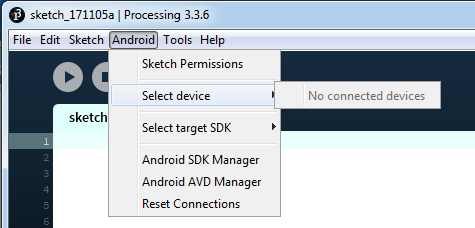
My phone cant be connected

$
0
0

Good evening! I'm writing to ask You about an advise. I've turned on USB debugging but when I link my mobile phone to the computer, Processing doesn't recognise my mobile. Безымянный1

APDE maximum file length?

$
0
0

Hello, I added a java file in my sketch on APDE but I just note the all files (written or imported), over a certain length, are truncated! Why?

Sound synthesis on Android (Oscillators)

$
0
0

Hi! I am looking for some advice on what tool to use to play generative sounds into an android device. So far I have had success playing .wav and .mp3 files using the "Cassette" library. However, what I want is to use a sound synthesizer like the one available for Processing 3: import processing.sound.*; Using functions to control oscillators, envelopes (etc.) for example: sine.amp(amp); sine.pan(); SinOsc SawOsc SqrOsc TriOsc Pulse

Thank you! E

Can't build android app with processing

$
0
0

Hello, I'm trying to get Processing 3.3.6 to work with Android Mode 4.0. With the Android SDK 3.0.1, target API level 26/min. If someone could help me get it to work I'd be very happy, but just as well would be if someone knows of a working (preferably recent) combination of Processing, Android Mode and Android SDK that I could work with.

When building I get this error: _"Failed to notify ProjectEvaluationListener.afterEvaluate(), but primary configuration failure takes precedence. java.lang.IllegalStateException: buildToolsVersion is not specified. ... FAILURE: Build failed with an exception.

  • Where: Build file 'C:\Users\Fredrik\AppData\Local\Temp\android971185864472813018sketch\app\build.gradle' line: 5

  • What went wrong: A problem occurred evaluating project ':app'.

    Invalid revision: android-7.0 ...

BUILD FAILED in 10s org.gradle.tooling.BuildException: Could not execute build using Gradle distribution 'https://services.gradle.org/distributions/gradle-4.0-bin.zip'. ... Caused by: org.gradle.internal.exceptions.LocationAwareException: Build file 'C:\Users\Fredrik\AppData\Local\Temp\android971185864472813018sketch\app\build.gradle' line: 5 A problem occurred evaluating project ':app'. ... Caused by: java.lang.NumberFormatException: Invalid revision: android-7.0 ..."_

What I tried to do: Reading the forums - Found a suggestion to fill in something under "package name" in the manifest file, did so. Changing the gradle file - At this point I noticed that Processing generates a new gradle file every time I try to build, so I have no way of changing the gradle file for use with Processing. Exporting the project to Android Studio - Here I could edit the gradle file, but it gave me some warnings that "this support library should not use a different version than the compiledSDKVersion (26)..." but renaming it didn't help. I also tried a) removing the "buildToolsVersion" since I read it was deprecated, and then changing it to "26.0.2" when I got complaints that there was no buildtool present. There were also some warnings about there being dependencies based on different builds, such as ...vector drawable and what else can be found in the "libs" folder where the processing-core.jar file is located.

This way I got as far as: _"FAILURE: Build failed with an exception.

  • What went wrong: Execution failed for task ':app:transformDexArchiveWithExternalLibsDexMergerForDebug'. > java.lang.RuntimeException: java.lang.RuntimeException: com.android.builder.dexing.DexArchiveMergerException: Unable to merge dex"_

Which I tried to fix with adding: defaultConfig{ ... multiDexEnabled true ...}

dependencies { implementation 'com.android.support:multidex:1.0.2' ...}

This finally gave me the error where I decided it was time to ask for help: "Error:Execution failed for task ':app:transformClassesWithMultidexlistForDebug'.

java.io.IOException: Can't write [C:\Users...\Processing\Sketches\MySketch\android\app\build\intermediates\multi-dex\debug\componentClasses.jar] (Can't read [C:\Users....gradle\caches\transforms-1\files-1.1\appcompat-v7-26.0.2.aar\d3fd61d402d7b6cb2538ad98c0c186e4\jars\classes.jar(;;;;;;**.class)] (Duplicate zip entry [classes.jar:android/support/v7/graphics/drawable/DrawerArrowDrawable.class]))"

At this point I'm not sure what to do and any help would be appreciated!

Trouble connecting Android Mode 4.0 to Sdk

$
0
0

Hello!

I had an old version of Android Mode working fine, but when I upgraded to 4.0, Processing could get set up with the Android Sdk. I am using Processing version 3.3.6.

  • I installed API 26 and its build tools
  • I followed the steps on [https://forum.processing.org/one/topic/android-problems.html](this forum page) including setting environment variables and updating JDK
  • When I manually changed preferences.txt to have android.sdk.path=[my path], Processing complains "Processing found an Android SDK, but is not valid. It could be missing some files, or might not be including the required platform for API 26."
  • Otherwise, it simply complains "Processing did not find an Android SDK on this computer."
  • If I locate the path manually it says the SDK could not be loaded
  • I even tried "Download SDK automatically". The download finished, and Processing said the SDK could not be loaded. I tried locating the SDK manually to where Processing had just downloaded it, and got the same error

I took a look at [https://forum.processing.org/two/discussion/12665/android-sdk-could-not-be-loaded](this post), but nothing there seemed to help.

Surely, there is something I am missing. Can anyone identify what I am doing wrong? Thank you very much in advance!

Viewing all 941 articles
Browse latest View live